
ControlJS part 2: delayed execution
This is the second of three blog posts about ControlJS – a JavaScript module for making scripts load faster. The three blog posts describe how ControlJS is used for async loading, delayed execution, and overriding document.write.
The goal of ControlJS is to give developers more control over how JavaScript is loaded. The key insight is to recognize that “loading†has two phases: download (fetching the bytes) and execution (including parsing). In ControlJS part 1 I focused on the download phase using ControlJS to download scripts asynchronously. In this post I focus on the benefits ControlJS brings to the execution phase of script loading.
The issue with execution
The issue with the execution phase is that while the browser is parsing and executing JavaScript it can’t do much else. From a performance perspective this means the browser UI is unresponsive, page rendering stops, and the browser won’t start any new downloads.
The execution phase can take more time than you might think. I don’t have hard numbers on how much time is spent in this phase (although it wouldn’t be that hard to collect this data with dynaTrace Ajax Edition or Speed Tracer). If you do anything computationally intensive with a lot of DOM interaction the blocking effects can be noticeable. If you have a large amount of JavaScript just parsing the code can take a significant amount of time.
If all the JavaScript was used immediately to render the page we might have to throw up our hands and endure these delays, but it turns out that a lot of the JavaScript downloaded isn’t used right away. Across the Alexa US Top 10 only 29% of the downloaded JavaScript is called before the window load event. (I surveyed this using Page Speed‘s “defer JavaScript” feature.) The other 71% of the code is parsed and executed even though it’s not used for rendering the initial page. For these pages an average of 229 kB of JavaScript is downloaded. That 229 kB is compressed – the uncompressed size is upwards of 500 kB. That’s a lot of JavaScript. Rather than parse and execute 71% of the JavaScript in the middle of page loading, it would be better to avoid that pain until after the page is done rendering. But how can a developer do that?
Loading feature code
To ease our discussion let’s call that 29% of code used to render the page immediate-code and we’ll call the other 71% feature-code. The feature-code is typically for DHTML and Ajax features such as drop down menus, popup dialogs, and friend requests where the code is only executed if the user exercises the feature. (That’s why it’s not showing up in the list of functions called before window onload.)
Let’s assume you’ve successfully split your JavaScript into immediate-code and feature-code. The immediate-code scripts are loaded as part of the initial page loading process using ControlJS’s async loading capabilities. The additional scripts that contain the feature-code could also be loaded this way during the initial page load process, but then the browser is going to lock up parsing and executing code that’s not immediately needed. So we don’t want to load the feature-code during the initial page loading process.
Another approach would be to load the feature-code after the initial page is fully rendered. The scripts could be loaded in the background as part of an onload handler. But even though the feature-code scripts are downloaded in the background, the browser still locks up when it parses and executes them. If the user tries to interact with the page the UI is unresponsive. This unnecessary delay is painful enough that the Gmail mobile team went out of their way to avoid it. To make matters worse, the user has no idea why this is happening since they didn’t do anything to cause the lock up. (We kicked it off “in the background”.)
The solution is to parse and execute this feature-code when the user needs it. For example, when the user first clicks on the drop down menu is when we parse and execute menu.js. If the user never uses the drop down menu, then we avoid the cost of parsing and executing that code altogether. But when the user clicks on that menu we don’t want her to wait for the bytes to be downloaded – that would take too long especially on mobile. The best solution is to download the script in the background but delay execution until later when the code is actually needed.
Download now, Execute later
After that lengthy setup we’re ready to look at the delayed execution capabilities of ControlJS. I created an example that has a drop down menu containing the links to the examples.
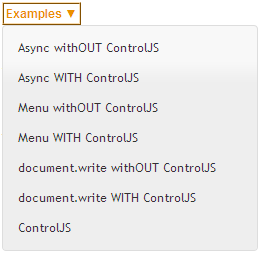
In order to illustrate the pain from lengthy script execution I added a 2 second delay to the menu code (a while loop that doesn’t relinquish until 2 seconds have passed). Menu withOUT ControlJS is the baseline case. The page takes a long time to render because it’s blocked while the scripts are downloaded and also during the 2 seconds of script execution.
On the other hand, Menu WITH ControlJS renders much more quickly. The scripts are downloaded asynchronously. Since these scripts are for an optional feature we want to avoid executing them until later. This is achieved by using the “data-cjsexec=false” attribute, in addition to the other ControlJS modifications to the SCRIPT’s TYPE and SRC attributes:
<script data-cjsexec=false type="text/cjs" data-cjssrc="jquery.min.js"></script>
<script data-cjsexec=false type="text/cjs" data-cjssrc="fg.menu.js"></script>
The “data-cjsexec=false” setting means that the scripts are downloaded and stored in the cache, but they’re not executed. The execution is triggered later if and when the user exercises the feature. In this case, clicking on the Examples button is the trigger:
examplesbtn.onclick = function() {
   CJS.execScript("jquery.min.js");
   CJS.execScript("fg.menu.js", createExamplesMenu);
};
CJS.execScript() creates a SCRIPT element with the specified SRC and inserts it into the DOM. The menu creation function, createExamplesMenu, is passed in as the onload callback function for the last script. The 2 second delay is therefore incurred the first time the user clicks on the menu, but it’s tied to a the user’s action, there’s no delay to download the script, and the execution delay only occurs once.
The ability to separate and control the download phase and the execution phase during script loading is a key differentiator of ControlJS. Many websites won’t need this option. But websites that have a lot of code that’s not used to render the initial page, such as Ajax web apps, will benefit from avoiding the pain of script parsing and execution until it’s absolutely necessary.
ControlJS part 1: async loading
This is the first of three blog posts about ControlJS – a JavaScript module for making scripts load faster. The three blog posts describe how ControlJS is used for async loading, delayed execution, and overriding document.write.
The #1 performance best practice I’ve been evangelizing over the past year is progressive enhancement: deliver the page as HTML so it renders quickly, then enhance it with JavaScript. There are too many pages that are blank while several hundred kB of JavaScript is downloaded, parsed, and executed so that the page can be created using the DOM.
It’s easy to evangelize progressive enhancement – it’s much harder to actually implement it. That several hundred kB of JavaScript has to be unraveled and reorganized. All the logic that created DOM elements in the browser via JavaScript has to be migrated to run on the server to generate HTML. Even with new server-side JavaScript capabilities this is a major redesign effort.
I keep going back to Opera’s Delayed Script Execution option. Just by enabling this configuration option JavaScript is moved aside so that page rendering can come first. And the feature works – I can’t find a single website the suffers any errors with this turned on. While I continue to encourage other browser vendors to implement this feature, I want a way for developers to get this behavior sooner rather than later.
A number of web accelerators (like Aptimize, Strangeloop, FastSoft, CloudFlare, Torbit, and more recently mod_pagespeed) have emerged over the last year or so. They modify the HTML markup to inject performance best practices into the page. Thinking about this model I considered ways that markup could be changed to more easily delay the impact of JavaScript on progressive rendering.
The result is a JavaScript module I call ControlJS.
Controlling download and execution
The goal of ControlJS is to give developers more control over how JavaScript is loaded. The key insight is to recognize that “loading” has two phases: download (fetching the bytes) and execution (including parsing). These two phases need to be separated and controlled for best results.
Controlling how scripts are downloaded is a popular practice among performance-minded developers. The issue is that when scripts are loaded the normal way (<script src=""...) they block other resource downloads (lesser so in newer browsers) and also block page rendering (in all browsers). Using asynchronous script loading techniques mitigates these issues to a large degree. I wrote about several asynchronous loading techniques in Even Faster Web Sites. LABjs and HeadJS are JavaScript modules that provide wrappers for async loading. While these async techniques address the blocking issues that occur during the script download phase, they don’t address what happens during the script execution phase.
Page rendering and new resource downloads are blocked during script execution. With the amount of JavaScript on today’s web pages ever increasing, the blocking that occurs during script execution can be significant, especially for mobile devices. In fact, the Gmail mobile team thought script execution was such a problem they implemented a new async technique that downloads JavaScript wrapped in comments. This allows them to separate the download phase from the execution phase. The JavaScript is downloaded so that it resides on the client (in the browser cache) but since it’s a comment there’s no blocking from execution. Later, when the user invokes the associated features, the JavaScript is executed by removing the comment and evaluating the code.
Stoyan Stefanov, a former teammate and awesome performance wrangler, recently blogged about preloading JavaScript without execution. His approach is to download the script as either an IMAGE or an OBJECT element (depending on the browser). Assuming the proper caching headers exist the response is cached on the client and can later be inserted as a SCRIPT element. This is the technique used in ControlJS.
ControlJS: how to use it
To use ControlJS you need to make three modifications to your page.
Modification #1: add control.js
I think it’s ironic that JavaScript modules for loading scripts asynchronously have to be loaded in a blocking manner. From the beginning I wanted to make sure that ControlJS itself could be loaded asynchronously. Here’s the snippet for doing that:
var cjsscript = document.createElement('script');
cjsscript.src = "control.js";
var cjssib = document.getElementsByTagName('script')[0];
cjssib.parentNode.insertBefore(cjsscript, cjssib);
Modification #2: change external scripts
The next step is to transform all of the old style external scripts to load the ControlJS way. The normal style looks like this:
<script type="text/javascript" src="main.js"><script>
The SCRIPT element’s TYPE attribute needs to be changed to “text/cjs” and the SRC attribute needs to be changed to DATA-CJSSRC, like this:
<script type="text/cjs" data-cjssrc="main.js"><script>
Modification #3: change inline scripts
Most pages have inline scripts in addition to external scripts. These scripts have dependencies: inline scripts might depend on external scripts for certain symbols, and vice versa. It’s important that the execution order of the inline scripts and external scripts is preserved. (This is a feature that some of the async wrappers overlook.)Â Therefore, inline scripts must also be converted by changing the TYPE attribute from “text/javascript” in the normal syntax:
<script type="text/javascript">
var name = getName();
<script>
to “text/cjs”, like this:
<script type="text/cjs">
var name = getName();
<script>
That’s it! ControlJS takes care of the rest.
ControlJS: how it works
Your existing SCRIPTs no longer block the page because the TYPE attribute has been changed to something the browser doesn’t recognize. This allows ControlJS to take control and load the scripts in a more high performance way. Let’s take a high-level look at how ControlJS works. You can also view the control.js script for more details.
We want to start downloading the scripts as soon as possible. Since we’re downloading them as an IMAGE or OBJECT they won’t block the page during the download phase. And since they’re not being downloaded as a SCRIPT they won’t be executed. ControlJS starts by finding all the SCRIPT elements that have the “text/cjs” type. If the script has a DATA-CJSSRC attribute then an IMAGE (for IE and Opera) or OBJECT (for all other browsers) is created dynamically with the appropriate URL. (See Stoyan’s post for the full details.)
By default ControlJS waits until the window load event before it begins the execution phase. (It’s also possible to have it start executing scripts immediately or once the DOM is loaded.) ControlJS iterates over its scripts a second time, doing so in the order they appear in the page. If the script is an inline script the code is extracted and evaluated. If the script is an external script and its IMAGE or OBJECT download has completed then it’s inserted in the page as a SCRIPT element so that the code is parsed and executed. If the IMAGE or OBJECT download hasn’t finished then it reenters the iteration after a short timeout and tries again.
There’s more functionality I’ll talk about in later posts regarding document.write and skipping the execution step. For now, let’s look at a simple async loading example.
Async example
To show ControlJS’s async loading capabilities I’ve created an example that contains three scripts in the HEAD:
- main.js – takes 4 seconds to download
- an inline script that references symbols from main.js
- page.js – takes 2 seconds to download and references symbols from the inline script
I made page.js take less time than main.js to make sure that the scripts are executed in the correct order (even though page.js downloads more quickly). I include the inline script because this is a pattern I see frequently (e.g., Google Analytics) but many script loader helpers don’t support inline scripts as part of the execution order.
Async withOUT ControlJS is the baseline example. It loads the scripts in the normal way. The HTTP waterfall chart generated in IE8 (using HttpWatch) is shown in Figure 1. IE8 is better than IE 6&7 – it loads scripts in parallel so main.js and page.js are downloaded together. But all versions of IE block image downloads until scripts are done, so images 1-4 get pushed out. Rendering is blocked by scripts in all browsers. In this example, main.js blocks rendering for four seconds as indicated by the green vertical line.
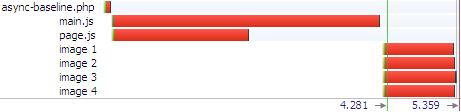
Figure 1: Async withOUT ControlJS waterfall chart (IE8)
Async WITH ControlJS demonstrates how ControlJS solves the blocking problems caused by scripts. Unlike the baseline example, the scripts and images are all downloaded in parallel shaving 1 second off the overall download time. Also, rendering starts immediately. If you load the two examples in your browser you’ll notice how dramatically faster the ControlJS page feels. There are three more requests in Figure 2’s waterfall chart. One is the request for control.js – this is loaded asynchronously so it doesn’t slow down the page. The other two requests are because main.js and page.js are loaded twice. The first time is when they are downloaded asynchronously as IMAGEs. Later, ControlJS inserts them into the page as SCRIPTs in order to get their JavaScript executed. Because main.js and page.js are already in the cache there’s no download penalty, only the short cache read indicated by the skinny blue line.
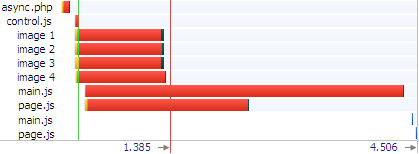
Figure 2: Async WITH ControlJS waterfall chart (IE8)
The ControlJS project
ControlJS is open source under the Apache License. The control.js script can be found in the ControlJS Google Code project. Discussion topics can be created in the ControlJS Google Group. The examples and such are on my website at the ControlJS Home Page. I’ve written this code as a proof of concept. I’ve only tested it on the major browsers. It needs more review before being used in a production environment.
Only part 1
This is only the first of three blog posts about ControlJS. There’s more to learn. This technique might seem like overkill. If all we wanted to do was load scripts asynchronously some other techniques might suffice. But my goal is to delay all scripts until after the page has rendered. This means that we have to figure out how to delay scripts that do document.write. Another goal is to support requirements like Gmail mobile had – the desire to download JavaScript but delay the blocking penalties that come during script execution. I’ll be talking about those features in the next two blog posts.
var name = getName();
Evolution of Script Loading
Velocity China starts tomorrow morning. I’m kicking it off with a keynote and am finishing up my slides. I’ll be talking about progressive enhancement and smart script loading. As I reviewed the slides it struck me how the techniques for loading external scripts have changed significantly in the last few years. Let’s take a look at what we did, where we are now, and try to see what the future might be.
Scripts in the HEAD
Just a few years ago most pages, even for the top websites, loaded their external scripts with HTML in the HEAD of the document:
<head> <script src=â€core.js†type=â€text/javascriptâ€></script> <script src=â€more.js†type=â€text/javascriptâ€></script> </head>
Developers in tune with web performance best practices cringe when they see scripts loaded this way. We know that older browsers (now that’s primarily Internet Explorer 6 & 7) load scripts sequentially. The browser downloads core.js and then parses and executes it. Then it does the same with more.js – downloads the script and then parses and executes it.
In addition to loading scripts sequentially, older browsers block other downloads until this sequential script loading phase is completed. This means there may be a significant delay before these browsers even start downloading stylesheets, images, and other resources in the page.
These download issues are mitigated in newer browsers (see my script loading roundup). Starting with IE 8, Firefox 3.6, Chrome 2, and Safari 4 scripts generally get downloaded in parallel with each other as well as with other types of resources. I say “generally†because there are still quirks in how browsers perform this parallel script loading. In IE 8 and 9beta, for example, images are blocked from being downloaded during script downloads (see this example). In a more esoteric use case, Firefox 3 loads scripts that are document.written into the page sequentially rather than in parallel.
Then there’s the issue with rendering being blocked by scripts: any DOM elements below a SCRIPT tag won’t be rendered until that script is finished loading. This is painful. The browser has already downloaded the HTML document but none of those Ps, DIVs, and ULs get shown to the user if there’s a SCRIPT above them. If you put the SCRIPT in the document HEAD then the entire page is blocked from rendering.
There are a lot of nuances in how browsers load scripts especially with the older browsers. Once I fully understood the impact scripts had on page loading I came up with my first recommendation to improve script loading:
Move Scripts to the Bottom
Back in 2006 and 2007 when I started researching faster script loading, all browsers had the same problems when it came to loading scripts:
- Scripts were loaded sequentially.
- Loading a script blocked all other downloads in the page.
- Nothing below the SCRIPT was rendered until the script was done loading.
The solution I came up with was to move the SCRIPT tags to the bottom of the page.
... <script src=â€core.js†type=â€text/javascriptâ€></script> <script src=â€more.js†type=â€text/javascriptâ€></script> </body>
This isn’t always possible, for example, scripts for ads that do document.write can’t be moved – they have to do their document.write in the exact spot where the ad is supposed to appear. But many scripts can be moved to the bottom of the page with little or no work. The benefits are immediately obvious – images download sooner and the page renders more quickly. This was one of my top recommendations in High Performance Web Sites. Many websites adopted this change and saw the benefits.
Load Scripts Asynchronously
Moving scripts to the bottom of the page avoided some problems, but other script loading issues still existed. During 2008 and 2009 browsers still downloaded scripts sequentially. There was an obvious opportunity here to improve performance. Although it’s true that scripts (often) need to be executed in order, they don’t need to be downloaded in order. They can be downloaded in any order – as long as the browser preserves the original order of execution.
Browser vendors realized this. (I like to think that I had something to do with that.) And newer browsers (starting with IE8, Firefox 3.6, Chrome 2, and Safari 4 as mentioned before) started loading scripts in parallel. But back in 2008 & 2009 sequential script loading was still an issue. I was analyzing MSN.com one day and noticed that their scripts loaded in parallel – even though this was back in the Firefox 2.0 days. They were using the Script DOM Element approach:
var se = document.createElement("script");
se.src = "core.js";
document.getElementsByTagName("head")[0].appendChild(se);
I’ve spent a good part of the last few years researching asynchronous script loading techniques like this. These async techniques (summarized in this blog post with full details in chapter 4 of Even Faster Web Sites) achieve parallel script loading in older browsers and avoid some of the quirks in newer browsers. They also mitigate the issues with blocked rendering: when a script is loaded using an async technique the browser charges ahead and renders the page while the script is being downloaded. This example has a script in the HEAD that’s loaded using the Script DOM Element technique. This script is configured to take 4 seconds to download. When you load the URL you’ll see the page render immediately, proving that rendering proceeds when scripts are loaded asynchronously.
Increased download parallelism and faster rendering – what more could you want? Well…
Async + On-demand Execution
Loading scripts asynchronously speeds up downloads (more parallelism) and rendering. But – when the scripts arrive at the browser rendering stops and the browser UI is locked while the script is parsed and executed. There wouldn’t be any room for improvement here if all that JavaScript was needed immediately, but websites don’t use all the code that’s downloaded – at least not right away. The Alexa US Top 10 websites download an average of 229 kB of JavaScript (compressed) but only execute 29% of those functions by the time the load event fires. The other 71% of code is cruft, conditional blocks, or most likely DHTML and Ajax functionality that aren’t used to render the initial page.
This discovery led to my recommendation to split the initial JavaScript download into the code needed to render the page and the code that can be loaded later for DHTML and Ajax features. (See this blog post or chapter 3 of EFWS.) Websites often load the code that’s needed later in the window’s onload handler. The Gmail Mobile team found wasn’t happy with the UI locking up when that later code arrived at the browser. After all, this DHTML/Ajaxy code might not even be used. They’re the first folks I saw who figured out a way to separate the download phase from the parse-execute phase of script loading. They did this by wrapping all the code in a comment, and then when the code is needed removing the comment delimiters and eval’ing. Gmail’s technique uses iframes so requires changing your existing scripts. Stoyan has gone on to explore using image and object tags to download scripts without the browser executing them, and then doing the parse-execute when the code is needed.
What’s Next?
Web pages are getting more complex. Advanced developers who care about performance need more control over how the page loads. Giving developers the ability to control when an external script is parsed and executed makes sense. Right now it’s way too hard. Luckily, help is on the horizon. Support for LINK REL=”PREFETCH” is growing. This provides a way to download scripts while avoiding parsing and execution. Browser vendors need to make sure the LINK tag has a load event so developers can know whether or not the file has finished downloading. Then the file that’s already in the browser’s cache can be added asynchronously using the Script DOM Element approach or some other technique only when the code is actually needed.
We’re close to having the pieces to easily go to the next level of script loading optimization. Until all the pieces are there, developers on the cutting edge will have to do what they always do – work a little harder and stay on top of the latest best practices. For full control over when scripts are downloaded and when they’re parsed and executed I recommend you take a look at the posts from Gmail Mobile and Stoyan.
Based on the past few years I’m betting there are more improvements to script loading still ahead.
Render first. JS second.
Let me start with the takeaway point:
The key to creating a fast user experience in today’s web sites is to render the page as quickly as possible. To achieve this JavaScript loading and execution has to be deferred.
I’m in the middle of several big projects so my blogging rate is down. But I got an email today about asynchronous JavaScript loading and execution. I started to type up my lengthy response and remembered one of those tips for being more productive: “type shorter emails – no one reads long emails anyway”. That just doesn’t resonate with me. I like typing long emails. I love going into the details. But, I agree that an email response that only a few people might read is not the best investment of time. So I’m writing up my response here.
It took me months to research and write the “Loading Scripts Without Blocking” chapter from Even Faster Web Sites. Months for a single chapter! I wasn’t the first person to do async script loading – I noticed it on MSN way before I started that chapter – but that work paid off. There has been more research on async script loading from folks like Google, Facebook and Meebo. Most JavaScript frameworks have async script loading features – two examples are YUI and LABjs. And 8 of today’s Alexa Top 10 US sites use advanced techniques to load scripts without blocking: Google, Facebook, Yahoo!, YouTube, Amazon, Twitter, Craigslist(!), and Bing. Yay!
The downside is – although web sites are doing a better job of downloading scripts without blocking, once those scripts arrive their execution still blocks the page from rendering. Getting the content in front of the user as quickly as possible is the goal. If asynchronous scripts arrive while the page is loading, the browser has to stop rendering in order to parse and execute those scripts. This is the biggest obstacle to creating a fast user experience. I don’t have scientific results that I can cite to substantiate this claim (that’s part of the big projects I’m working on). But anyone who disables JavaScript in their browser can attest that sites feel twice as fast.
My #1 goal right now is to figure out ways that web sites can defer all JavaScript execution until after the page has rendered. Achieving this goal is going to involve advances from multiple camps – changes to browsers, new web development techniques, and new pieces of infrastructure. I’ve been talking this up for a year or so. When I mention this idea these are the typical arguments I hear for why this won’t work:
In response to this argument I point to Opera’s Delayed Script Execution feature. I encourage you to turn it on, surf around, and try to find a site that breaks. Even sites like Gmail and Facebook work! I’m sure there are some sites that have problems (perhaps that’s why this feature is off by default). But if some sites do have problems, how many sites are we talking about? And what’s the severity of the problems? We definitely don’t want errors, rendering problems, or loss of ad revenue. Even though Opera has had this feature for over two years (!), I haven’t heard much discussion about it. Imagine what could happen if significant resources focused on this problem.
What are the next steps?
- Browsers should look at Opera’s behavior and implement the SCRIPT ASYNC and DEFER attributes.
- Developers should adopt asynchronous script loading techniques and avoid rendering the initial page view with JavaScript on the client.
- Third party snippet providers, most notably ads, need to move away from document.write.
newtwitter performance analysis
Among the exciting launches last week was newtwitter – the amazing revamp of the Twitter UI. I use Twitter a lot and was all over the new release, and so was stoked to see this tweet from Twitter developer Ben Cherry:

The new Twitter UI looks good, but how does it score when it comes to performance? I spent a few hours investigating. I always start with HTTP waterfall charts, typically generated by HttpWatch. I look at Firefox and IE because they’re the most popular browsers (and I use a lot of Firefox tools). Here’s the waterfall chart for Firefox 3.6.10:
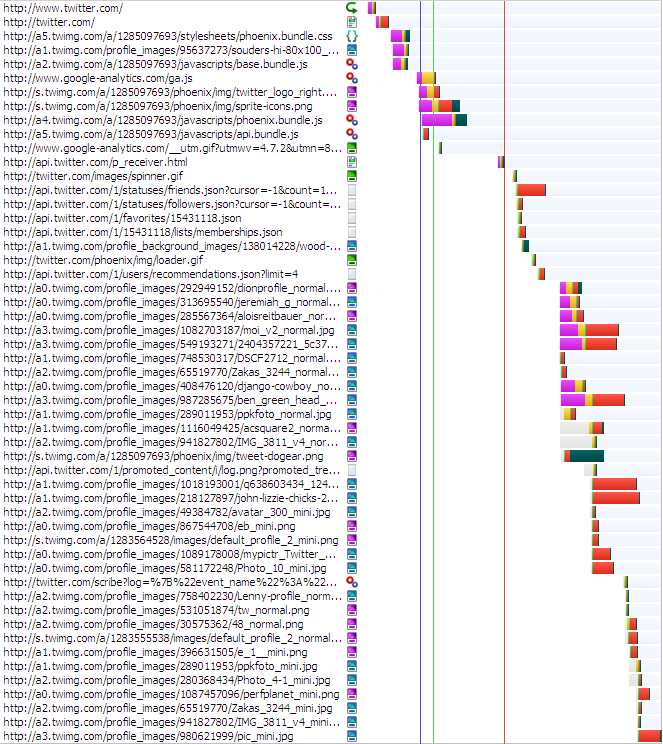
I used to look at IE7 but its market share is dropping, so now I start with IE8. Here’s the waterfall chart for IE8:
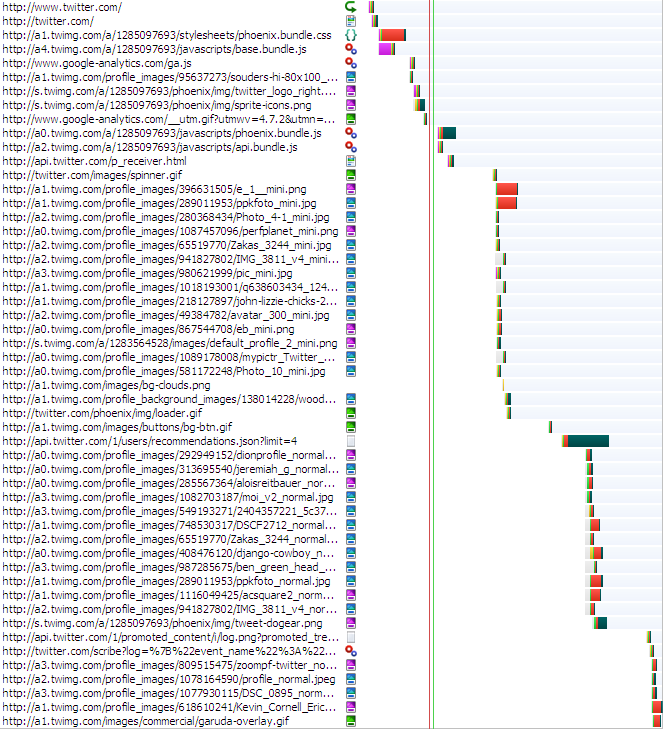
From the waterfall charts I generate a summary to get an idea of the overall page size and potential for problems.
| Firefox 3.6.10 | IE8 | |
|---|---|---|
| main content rendered | ~4 secs | ~5 secs |
| window onload | ~2 secs | ~7 secs |
| network activity done | ~5 secs | ~7 secs |
| # requests | 53 | 52 |
| total bytes downloaded | 428 kB | 442 kB |
| JS bytes downloaded | 181 kB | 181 kB |
| CSS bytes downloaded | 21 kB | 21 kB |
I study the waterfall charts looking for problems, primarily focused on places where parallel downloading stops and where there are white gaps. Then I run Page Speed and YSlow for more recommendations. Overall newtwitter does well, scoring 90 on Page Speed and 86 on YSlow. Combining all of this investigation results in this list of performance suggestions:
- Script Loading – The most important thing to do for performance is get JavaScript out of the way. “Out of the way” has two parts:
- blocking downloads – Twitter is now using the new Google Analytics async snippet (yay!) so ga.js isn’t blocking. However, base.bundle.js is loaded using normal SCRIPT SRC, so it blocks. In newer browsers there will be some parallel downloads, but even IE9 will block images until the script is done downloading. In both Firefox and IE it’s clear this is causing a break in parallel downloads. phoenix.bundle.js and api.bundle.js are loaded using LABjs in conservative mode. In both Firefox and IE there’s a big block after these two scripts. It could be LABjs missing an opportunity, or it could be that the JavaScript is executing. But it’s worth investigating why all the resources lower in the page (~40 of them) don’t start downloading until after these scripts are fetched. It’d be better to get more parallelized downloads.
- blocked rendering – The main part of the page takes 4-5 seconds to render. In some cases this is because the browser won’t render anything until all the JavaScript is downloaded. However, in this page the bulk of the content is generated by JS. (I concluded this after seeing that many of the image resources are specified in JS.) Rather than download a bunch of scripts to dynamically create the DOM, it’d be better to do this on the server side as HTML as part of the main HTML document. This can be a lot of work, but the page will never be fast for users if they have to wait for JavaScript to draw the main content in the page. After the HTML is rendered, the scripts can be downloaded in the background to attach dynamic behavior to the page.
- scattered inline scripts – Fewer inline scripts are better. The main reason is that a stylesheet followed by an inline script blocks subsequent downloads. (See Positioning Inline Scripts.) In this page, phoenix.bundle.css is followed by the Google Analytics inline script. This will cause the resources below that point to be blocked – in this case the images. It’d be better to move the GA snippet to the SCRIPT tag right above the stylesheet.
- Optimize Images – This one image alone could be optimized to save over 40K (out of 52K): http://s.twimg.com/a/1285108869/phoenix/img/tweet-dogear.png.
- Expires header is missing – Strangely, some images are missing both the Expires and Cache-Control headers, for example, http://a2.twimg.com/profile_images/30575362/48_normal.png. My guess is this is an origin server push problem.
- Cache-Control header is missing – Scripts from Amazon S3 have an Expires header, but no Cache-Control header (eg http://a2.twimg.com/a/1285097693/javascripts/base.bundle.js). This isn’t terrible, but it’d be good to include Cache-Control: max-age. The reason is that Cache-Control: max-age is relative (“# of seconds from right now”) whereas Expires is absolute (“Wed, 21 Sep 2011 20:44:22 GMT”). If the client has a skewed clock the actual cache time could be different than expected. In reality this happens infrequently.
- redirect – http://www.twitter.com/ redirects to http://twitter.com/. I love using twitter.com instead of www.twitter.com, but for people who use “www.” it would be better not to redirect them. You can check your logs and see how often this happens. If it’s small (< 1% of unique users per day) then it’s not a big problem.
- two spinners – Could one of these spinners be eliminated: http://twitter.com/images/spinner.gif and http://twitter.com/phoenix/img/loader.gif ?
- mini before profile – In IE the “mini” images are downloaded before the normal “profile” images. I think the profile images are more important, and I wonder why the order in IE is different than Firefox.
- CSS cleanup – Page Speed reports that there are > 70 very inefficient CSS selectors.
- Minify – Minifying the HTML document would save ~5K. Not big, but it’s three roundtrips for people on slow connections.


Overall newtwitter is beautiful and fast. Most of the Top 10 web sites are using advanced techniques for loading JavaScript. That’s the key to making today’s web apps fast.
Redirect caching deep dive
I was talking to a performance guru today who considers redirects one of the top two performance problems impacting web pages today. (The other was document.write.) I agree redirects are an issue, so much so that I wrote a chapter on avoiding redirects in High Performance Web Sites. What makes matters worse is that, even though redirects are cacheable, most browsers (even the new ones) don’t cache them.
Another performance guru, Eric Lawrence, sent me an email last week pointing out how cookies, status codes, and response headers affect redirect caching. Even though there are a few redirect tests in Browserscope, they don’t test all of these conditions. I wanted a more thorough picture of the state of redirect caching across browsers.
The Redirect Caching Tests page provides a test harness for exercising different redirect caching scenarios.
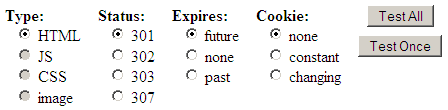
You can use the “Test Once” button to test a specific scenario, but if you choose “Test All” the harness runs through all the tests and offers to post the results (anonymously) to Browserscope. Here’s a snapshot of the results:
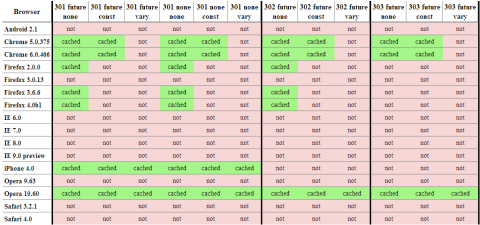
I realize you can’t read the results, but suffice it to say red is bad. If you click on the table you’ll go to the full results. They’re broken into two tables: redirects that should be cached, and redirects that should not be cached. For example, a 301 response with an expiration date in the future should be cached, but a 302 redirect with an expiration date in the past shouldn’t be cached. The official ruling can be found in RFC 2616. (Also, discussions Eric had with Mark Nottingham, chair of the Httpbis working group, indicate that 303 redirects with a future expiration date should be cached.)
Chrome, iPhone, and Opera 10.60 are doing the best job, but there’s still a lot of missed opportunities. IE 9 platform preview 3 still doesn’t cache any redirects, but Eric’s blog post, Caching Improvements in Internet Explorer 9, describes how that’ll be in the final version of IE9. If you use redirects that don’t change, make sure to use a 301 status code and set an expiration date in the future. That will ensure they’re cached in Chome, Firefox, iPhone, Opera, and IE9.
Please help out by running the test on your browser (especially mobile!) and contributing the results back to Browserscope so we can help browser vendors know what needs to be fixed.
Velocity: TCP and the Lower Bound of Web Performance
John Rauser (Amazon) was my favorite speaker at Velocity. His keynote on Creating Cultural Change was great. I recommend you watch the video.
John did another session that was longer and more technical entitled TCP and the Lower Bound of Web Performance. Unfortunately this wasn’t scheduled in the videotape room. But yesterday Mike Bailey contacted me saying he had recorded the talk with his Flip. With John’s approval, Mike has uploaded his video of John Rauser’s TCP talk from Velocity. This video runs out before the end of the talk, so make sure to follow along in the slides so you can walk through the conclusion yourself. [Update: Mike Bailey uploaded the last 7 minutes, so now you can hear the conclusion directly from John!]
John starts by taking a stab at what we should expect for coast-to-coast roundtrip latency:
- Roundtrip distance between the west coast and the east coast is 7400 km.
- The speed of light in a vacuum is 299,792.458 km/second.
- So the theoretical minimum for roundtrip latency is 25 ms.
- But light’s not traveling in a vacuum. It’s propagating in glass in fiber optic cables.
- The index of refraction of glass is 1.5, which means light travels at 66% of the speed in glass that it does in a vacuum.
- So a more realistic roundtrip latency is ~37 ms.
- Using a Linksys wireless router and a Comcast cable connection, John’s roundtrip latency is ~90ms. Which isn’t really that bad, given the other variables involved.
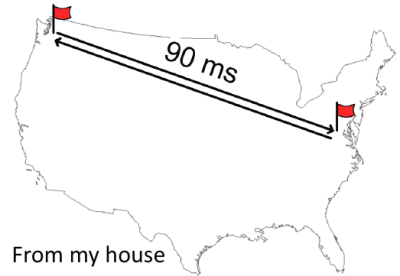
The problem is it’s been like this for well over a decade. This is about the same latency that Stuart Cheshire found in 1996. This is important because as developers we know that network latency matters when it comes to building a responsive web app.
With that backdrop, John launches into a history of TCP that leads us to the current state of network latency. The Internet was born in September of 1981 with RFC 793 documenting the Transmission Control Protocol, better known as TCP.
Given the size of the TCP window (64 kB) there was a chance for congestion, as noted in Congestion Control in IP/TCP Internetworks (RFC 896):
Should the round-trip time exceed the maximum retransmission interval for any host, that host will begin to introduce more and more copies of the same datagrams into the net. The network is now in serious trouble. Eventually all available buffers in the switching nodes will be full and packets must be dropped. Hosts are sending each packet several times, and eventually some copy of each packet arrives at its destination. This is congestion collapse.
This condition is stable. Once the saturation point has been reached, if the algorithm for selecting packets to be dropped is fair, the network will continue to operate in a degraded condition. Congestion collapse and pathological congestion are not normally seen in the ARPANET / MILNET system because these networks have substantial excess capacity.
Although it’s true that in 1984, when RFC 896 was written, the Internet had “substantial excess capacity”, that quickly changed. In 1981 there were 213 hosts on the Internet. But the number of hosts started growing rapidly. In October of 1986, with over 5000 hosts on the Internet, there occurred the first in a series of congestion collapse events.

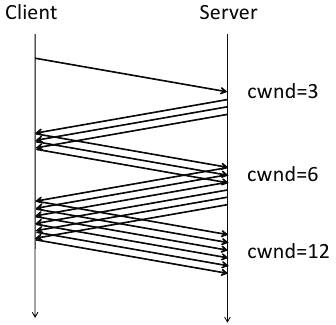
This led to the development of the TCP slow start algorithm, as described in RFCs 2581, 3390, and 1122. The key to this algorithm is the introduction of a new concept called the congestion window (cwnd) which is maintained by the server. The basic algorithm is:
- initalize cwnd to 3 full segments
- increment cwnd by one full segment for each ACK
TCP slow start was widely adopted. As seen in the following packet flow diagram, the number of packets starts small and doubles, thus avoiding the congestion collision experienced previously.
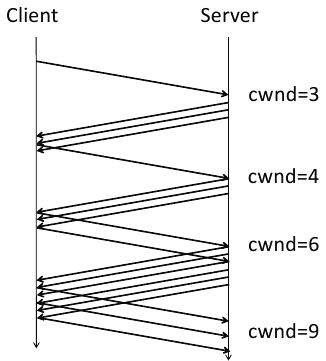
There were still inefficiencies, however. In some situations, too many ACKs would be sent. Thus we now have the delayed ACK algorithm from RFC 813. So the nice packet growth seen above now looks like this:
At this point, after referencing so many RFCs and showing numerous ACK diagrams, John aptly asks, “Why should we care?” Sadly, the video stops at this point around slide 160. But if we continue through the slides we see how John brings us back to what web developers deal with on a daily basis.
Keeping in mind that the size of a segment is 1460 bytes (“1500 octets” as specified in RFC 894 minus 40 bytes for TCP and IP headers), we see how many roundtrips are required to deliver various payload sizes. (I overlaid a kB conversion in red.)
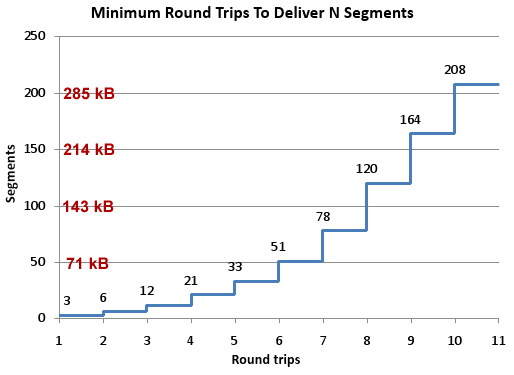
John’s conclusion is that “TCP slow start means that network latency strictly limits the throughput of fresh connections.” He gives these recommendations for what can be done about the situation:
- Carefully consider every byte of content
- Think about what goes into those first few packets
- 2.1 Keep your cookies small
- 2.2 Open connections for assets in the first three packets
- 2.3 Download small assets first
- Accept the speed of light (move content closer to users)
All web developers need at least a basic understanding of the protocol used by their apps. John delivers a great presentation that is informative and engaging, with real takeaways. Enjoy!
Velocity: Forcing Gzip Compression

Tony Gentilcore was my officemate when I first started at Google. I was proud of my heritage as “the YSlow guy”. After all, YSlow was well over 1M downloads. After a few days I found out that Tony was the creator of Fasterfox – topping 11M downloads. Needless to say, we hit it off and had a great year brainstorming techniques for optimizing web performance.
During that time, Tony was working with the Google Search team and discovered something interesting: ~15% of users with gzip-capable browsers were not sending an appropriate Accept-Encoding request header. As a result, they were sent uncompressed responses that were 3x bigger resulting in slower page load times. After some investigation, Tony discovered that intermediaries (proxies and anti-virus software) were stripping or munging the Accept-Encoding header. My blog post Who’s not getting gzip? summarizes the work with links to more information. Read Tony’s chapter in Even Faster Web Sites for all the details.
Tony is now working on Chrome, but the discovery he made has fueled the work of Andy Martone and others on the Google Search team to see if they could improve page load times for users who weren’t getting compressed responses. They had an idea:
For requests with missing or mangled Accept-Encoding headers, inspect the User-Agent to identify browsers that should understand gzip.
Test their ability to decompress gzip.
If successful, send them gzipped content!
This is a valid strategy given that the HTTP spec says that, in the absence of an Accept-Encoding header, the server may send a different content encoding based on additional information (such as the encodings known to be supported by the particular client).
During his presentation at Velocity, Forcing Gzip Compression, Andy describes how Google Search implemented this technique:
- At the bottom of a page, inject JavaScript to:
- Check for a cookie.
- If absent, set a session cookie saying “compression NOT ok”.
- Write out an iframe element to the page.
- The browser then makes a request for the iframe contents.
- The server responds with an HTML document that is always compressed.
- If the browser understands the compressed response, it executes the inlined JavaScript and sets the session cookie to “compression ok”.
- On subsequent requests, if the server sees the “compression ok” cookie it can send compressed responses.
The savings are significant. An average Google Search results page is 34 kB, which compresses down to 10 kB. The ability to send a compressed response cuts page load times by ~15% for these affected users.
Andy’s slides contain more details about how to only run the test once, recommended cookie lifetimes, and details on serving the iframe. Since this discovery I’ve talked to folks at other web sites that confirm these mysterious requests that are missing an Accept-Encoding header. Check it out on your web site – 15% is a significant slice of users! If you’d like to improve their page load times, take Andy’s advice and send them a compressed response that is smaller and faster.
Mobile cache file sizes
Mobile is big, but knowledge about how to make a mobile web site fast is lacking. The state of mobile web performance is in a similar place as desktop was six years ago when I started my performance deep dive. How many of us are happy with the speed of web pages on mobile? (I’m not.) How many of us know the top 10 best practices for building high performance mobile web sites? (I don’t.)
I’ve been focusing more on mobile in order to help build this set of best practices. Browserscope is a valuable resource since it measures all browsers, both mobile and desktop. The Network category for popular mobile browsers shows information about max connections per hostname, parallel script loading, redirect caching, and more. Since Browserscope’s data is crowdsourced it’s easy to get coverage on a wide variety of mobile devices. The table below shows the results from Browserscope for some popular mobile devices.

One thing I’ve wanted to measure on mobile is the browser’s cache. Caching on mobile devices is a cause for concern. In my experience a page I visited just a few minutes ago doesn’t seem to be cached when I visit it again. A few months ago I started creating tests for measuring the browser’s cache.
That’s why I was especially excited to see Ryan Grove’s post on Mobile Browser Cache Limits. I noticed his results were quite different from mine, so I commented on his blog post and invited him to contact me. Which he did! It’s great to find someone to collaborate with, especially when designing tests like this where another pair of eyes is a big help.
Ryan and I created a new test design. He’s deployed his under the name cachetest on GitHub. My implementation is called Max Cache File Size. I’m hosting it so you can run it immediately. I’ve integrated it with Browserscope as a User Test. Anyone who runs my hosted version has the option to post their results (anonymously) to Browserscope and contribute to building a repository for script cache sizes for all browsers.
Here’s a link to the Max Cache File Size results on Browserscope. A summary of the results with some other findings follows:
| Browser | Max Cached Script Size Same Session |
Cache Cross Lock/Unlock |
Cache Cross Power Cycle |
|---|---|---|---|
| Android 2.1 | 4 MB | yes | yes |
| Android 2.2 | 2 MB | yes | yes |
| iPad | 4 MB | yes | no |
| iPhone 3 | 4 MB | yes | no |
| iPhone 4 | 4 MB | yes | no |
| Palm Pre | 1 MB | yes | yes |
My Max Cache File Size test measures the largest script that’s cached in the same session (going from one page to another page). Many mobile devices reach the maximum size tested – 4MB. It’s interesting to see that in the recent upgrade from Android 2.1 to 2.2, the maximum cached script size drops from 4MB to 2MB. The Palm Pre registers at 320kB – much smaller than the others but large enough to handle many real world situations. Note that these sizes are the script’s uncompressed size.
Knowing the cache size that applies during a single session is valuable, but users often revisit pages after locking and unlocking their device, and some users might even power cycle their device between visits. Ryan and I manually tested a few devices under these scenarios – the results are shown in the previous table. Although results are mixed for the power cycling case, the cached items persist across lock/unlock. For me personally, this is the more typical case. (I only power cycle when I’m on the plane or need to reset the device.)
These results show that the 15 kB and 25 kB size limit warnings for a single resource are no longer a concern for mobile devices. However, even though the test went as high as 4 MB (uncompressed), I dearly hope you’re not even close to that size. (I saw similar results for stylesheets, but removed them from the automated test because stylesheets over ~1 MB cause problems on the iPhone.)
It’s great to have this data, and have it verified by different sources. But this is only testing the maximum size of a single script and stylesheet that can be cached. I believe the bigger issue for mobile is the maximum cache size. A few months ago I wrote a Call to improve browser caching. I wrote that in the context of desktop browsers, where I have visibility into the browser’s cache and available disk space. I think the size of mobile caches is even smaller. If you have information about the size of the browser cache on mobile devices, or tests to determine that, please share them in the comments below.
Finally, please run the Max Cache File Size test and add more data to the results.
Many thanks to Ryan Grove for working on this caching test – check out his updated post: Mobile Browser Cache Limits, Revisited. And thanks to Lindsey Simon for making Browserscope such a great framework for crowdsourcing browser performance data.
Diffable: only download the deltas
There were many new products and projects announced at Velocity, but one that I just found out about is Diffable. It’s ironic that I missed this one given that it happened at Velocity and is from Google. The announcement was made during a whiteboard talk, so it didn’t get much attention. If your web site has large JavaScript downloads you’ll want to learn more about this performance optimization technique.
The Diffable open source project has plenty of information, including the Diffable slides used by Josh Harrison and James deBoer at Velocity. As explained in the slides, Diffable uses differential compression to reduce the size of JavaScript downloads. It makes a lot of sense. Suppose your web site has a large external script. When a new release comes out, it’s often the case that a bulk of that large script is unchanged. And yet, users have to download the entire new script even if the old script is still cached.
Josh and James work on Google Maps which has a main script that is ~300K. A typical revision for this 300K script produces patches that are less than 20K. It’s wasteful to download that other 280K if the user has the old revision in their cache. That’s the inspiration for Diffable.
Diffable is implemented on the server and the client. The server component records revision deltas so it can return a patch to bring older versions up to date. The client component (written in JavaScript) detects if an older version is cached and if necessary requests the patch to the current version. The client component knows how to merge the patch with the cached version and evals the result.
The savings are significant. Using Diffable has reduced page load times in Google Maps by more than 1200 milliseconds (~25%). Note that this benefit only affects users that have an older version of the script in cache. For Google Maps that’s 20-25% of users.
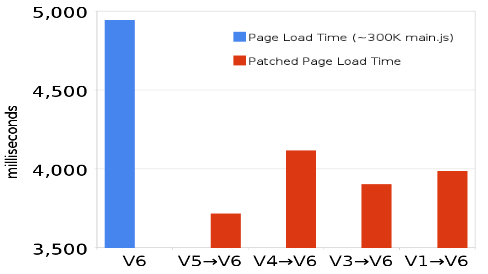
In this post I’ve used scripts as the example, but Diffable works with other resources including stylesheets and HTML. The biggest benefit is with scripts because of their notorious blocking behavior. The Diffable slides contain more information including how JSON is used as the delta format, stats that show there’s no performance hit for using eval, and how Diffable also causes the page to be enabled sooner due to faster JavaScript execution. Give it a look.