
Flushing the Document Early
This post is based on a chapter from Even Faster Web Sites, the follow-up to High Performance Web Sites. Posts in this series include: chapters and contributing authors, Splitting the Initial Payload, Loading Scripts Without Blocking, Coupling Asynchronous Scripts, Positioning Inline Scripts, Sharding Dominant Domains, Flushing the Document Early, Using Iframes Sparingly, and Simplifying CSS Selectors.
The Performance Golden Rule reminds us that for most web sites, 80-90% of the load time is on the front end. However, for some pages, the time it takes the back end to generate the HTML document is more than 10-20% of the overall page load time. Even if the HTML document is generated quickly on the back end, it may still take a long time before it’s received by the browser for users in remote locations or with slow connections. While the HTML document is being generated on the back end and sent over the wire, the browser is waiting idly. What a waste! Instead of letting the browser sit there doing nothing, web developers can use flushing to jumpstart page loading even before the HTML document response is fully received.
Flushing is when the server sends the initial part of the HTML document to the client before the entire response is ready. All major browsers start parsing the partial response. When done correctly, flushing results in a page that loads and feels faster. The key is choosing the right point at which to flush the partial HTML document response. The flush should occur before the expensive parts of the back end work, such as database queries and web service calls. But the flush should occur after the initial response has enough content to keep the browser busy. The part of the HTML document that is flushed should contain some resources as well as some visible content. If resources (e.g., stylesheets, external scripts, and images) are included, the browser gets an early start on its download work. If some visible content is included, the user receives feedback sooner that the page is loading.
Most HTML templating languages, including PHP, Perl, Python, and Ruby, contain a “flush” function. Getting flushing to work can be tricky. Problems arise when output is buffered, chunked encoding is disabled, proxies or anti-virus software interfere, or the flushed response is too small. Scanning the comments in PHP’s flush documentation shows that it can be hard to get all the details correct. Perhaps that’s why most of the U.S. top 10 sites don’t flush the document early. One that does is Google Search.
 Google Search flushing early
The HTTP waterfall chart for Google Search shows the benefits of flushing the document early. While the HTML document response (the first bar) is still being received, the browser has already started downloading one of the images used in the page, nav_logo4.png (the second bar). By flushing the document early, you make your pages start downloading resources and rendering content more quickly. This is a benefit that all users will appreciate, especially those with slow Internet connections and high latency.

Sharding Dominant Domains
This post is based on a chapter from Even Faster Web Sites, the follow-up to High Performance Web Sites. Posts in this series include: chapters and contributing authors, Splitting the Initial Payload, Loading Scripts Without Blocking, Coupling Asynchronous Scripts, Positioning Inline Scripts, Sharding Dominant Domains, Flushing the Document Early, Using Iframes Sparingly, and Simplifying CSS Selectors.
Rule 9 from High Performance Web Sites says reducing DNS lookups makes web pages faster. This is true, but in some situations, it’s worthwhile to take a bunch of resources that are being downloaded on a single domain and split them across multiple domains. I call this domain sharding. Doing this allows more resources to be downloaded in parallel, reducing the overall page load time.
To determine if domain sharding makes sense, you have to see if the page has a dominant domain being used for downloading resources. The following HTTP waterfall chart, for Yahoo.com, is indicative of a site being slowed down by a dominant domain. This waterfall chart shows the page being downloaded in Internet Explorer 7, which only allows two parallel downloads per hostname. The vertical lines show that typically there are only two simultaneous downloads at any given time. Looking at the resource URLs, we see that almost all of them are served from “l.yimg.com.” Sharding these resources across two domains, such as “l1.yimg.com” and “l2.yimg.com”, would cause the resources to download in about half the time.

Most of the U.S. top ten web sites do domain sharding. YouTube uses i1.ytimg.com, i2.ytimg.com, i3.ytimg.com, and i4.ytimg.com. Live Search uses ts1.images.live.com, ts2.images.live.com, ts3.images.live.com, and ts4.images.live.com. Both of these sites are sharding across four domains. What’s the optimal number? Yahoo! released a study that recommends sharding across at least two, but no more than four, domains. Above four, performance actually degrades.
Not all browsers are restricted to just two parallel downloads per hostname. Opera 9+ and Safari 3+ do four downloads per hostname. Internet Explorer 8, Firefox 3, and Chrome 1+ do six downloads per hostname. Sharding across two domains is a good compromise that improves performance in all browsers.
Positioning Inline Scripts
This post is based on a chapter from Even Faster Web Sites, the follow-up to High Performance Web Sites. Posts in this series include: chapters and contributing authors, Splitting the Initial Payload, Loading Scripts Without Blocking, Coupling Asynchronous Scripts, Positioning Inline Scripts, Sharding Dominant Domains, Flushing the Document Early, Using Iframes Sparingly, and Simplifying CSS Selectors.
My first three chapters in Even Faster Web Sites (Splitting the Initial Payload, Loading Scripts Without Blocking, and Coupling Asynchronous Scripts), focus on external scripts. But inline scripts block downloads and rendering just like external scripts do. The Inline Scripts Block example contains two images with an inline script between them. The inline script takes five seconds to execute. Looking at the HTTP waterfall chart, we see that the second image (which occurs after the inline script) is blocked from downloading until the inline script finishes executing.

Inline scripts block rendering, just like external scripts, but are worse. External scripts only block the rendering of elements below them in the page. Inline scripts block the rendering of everything in the page. You can see this by loading the Inline Scripts Block example in a new window and count off the five seconds before anything is displayed.
Here are three strategies for avoiding, or at least mitigating, the blocking behavior of inline scripts.
- move inline scripts to the bottom of the page – Although this still blocks rendering, resources in the page aren’t blocked from downloading.
- use setTimeout to kick off long executing code – If you have a function that takes a long time to execute, launching it via setTimeout allows the page to render and resources to download without being blocked.
- use DEFER – In Internet Explorer and Firefox 3.1 or greater, adding the DEFER attribute to the inline SCRIPT tag avoids the blocking behavior of inline scripts.
It’s especially important to avoid placing inline scripts between a stylesheet and any other resources in the page. This will make it as if the stylesheet was blocking the resources that follow from downloading. The reason for this behavior is that all major browsers preserve the order of CSS and JavaScript. The stylesheet has to be fully downloaded, parsed, and applied before the inline script is executed. And the inline script must be executed before the remaining resources can be downloaded. Therefore, resources that follow a stylesheet and inline script are blocked from downloading.
It’s better to explain this with an example. Below is the HTTP waterfall chart for eBay.com. Normally, the stylesheets and the first script would be downloaded in parallel.1 But after the stylesheet, there’s an inline script (with just one line of code). This causes the external script to be blocked from downloading until the stylesheet is received.

Stylesheet followed by inline script blocks downloads on eBay
This unnecessary blocking also happens on MSN, MySpace, and Wikipedia. The workaround is to move inline scripts above stylesheets or below other resources. This will increase parallel downloads resulting in a faster page.
Loading Scripts Without Blocking
This post is based on a chapter from Even Faster Web Sites, the follow-up to High Performance Web Sites. Posts in this series include: chapters and contributing authors, Splitting the Initial Payload, Loading Scripts Without Blocking, Coupling Asynchronous Scripts, Positioning Inline Scripts, Sharding Dominant Domains, Flushing the Document Early, Using Iframes Sparingly, and Simplifying CSS Selectors.
As more and more sites evolve into “Web 2.0” apps, the amount of JavaScript increases. This is a performance concern because scripts have a negative impact on page performance. Mainstream browsers (i.e., IE 6 and 7)Â block in two ways:
- Resources in the page are blocked from downloading if they are below the script.
- Elements are blocked from rendering if they are below the script.
The Scripts Block Downloads example demonstrates this. It contains two external scripts followed by an image, a stylesheet, and an iframe. The HTTP waterfall chart from loading this example in IE7 shows that the first script blocks all downloads, then the second script blocks all downloads, and finally the image, stylesheet, and iframe all download in parallel. Watching the page render, you’ll notice that the paragraph of text above the script renders immediately. However, the rest of the text in the HTML document is blocked from rendering until all the scripts are done loading.

Scripts block downloads in IE6&7, Firefox 2&3.0, Safari 3, Chrome 1, and Opera
Browsers are single threaded, so it’s understandable that while a script is executing the browser is unable to start other downloads. But there’s no reason that while the script is downloading the browser can’t start downloading other resources. And that’s exactly what newer browsers, including Internet Explorer 8, Safari 4, and Chrome 2, have done. The HTTP waterfall chart for the Scripts Block Downloads example in IE8 shows the scripts do indeed download in parallel, and the stylesheet is included in that parallel download. But the image and iframe are still blocked. Safari 4 and Chrome 2 behave in a similar way. Parallel downloading improves, but is still not as much as it could be.

Scripts still block, even in IE8, Safari 4, and Chrome 2
Fortunately, there are ways to get scripts to download without blocking any other resources in the page, even in older browsers. Unfortunately, it’s up to the web developer to do the heavy lifting.
There are six main techniques for downloading scripts without blocking:
- XHR Eval – Download the script via XHR and
eval()the responseText. - XHR Injection – Download the script via XHR and inject it into the page by creating a script element and setting its
textproperty to the responseText. - Script in Iframe – Wrap your script in an HTML page and download it as an iframe.
- Script DOM Element – Create a script element and set its
srcproperty to the script’s URL. - Script Defer – Add the script tag’s
deferattribute. This used to only work in IE, but is now in Firefox 3.1. document.writeScript Tag – Write the<script src="">HTML into the page usingdocument.write. This only loads script without blocking in IE.
You can see an example of each technique using Cuzillion. It turns out that these techniques have several important differences, as shown in the following table. Most of them provide parallel downloads, although Script Defer and document.write Script Tag are mixed. Some of the techniques can’t be used on cross-site scripts, and some require slight modifications to your existing scripts to get them to work. An area of differentiation that’s not widely discussed is whether the technique triggers the browser’s busy indicators (status bar, progress bar, tab icon, and cursor). If you’re loading multiple scripts that depend on each other, you’ll need a technique that preserves execution order.
| Technique | Parallel Downloads | Domains can Differ | Existing Scripts | Busy Indicators | Ensures Order | Size (bytes) |
|---|---|---|---|---|---|---|
| XHR Eval | IE, FF, Saf, Chr, Op | no | no | Saf, Chr | – | ~500 |
| XHR Injection | IE, FF, Saf, Chr, Op | no | yes | Saf, Chr | – | ~500 |
| Script in Iframe | IE, FF, Saf, Chr, Op | no | no | IE, FF, Saf, Chr | – | ~50 |
| Script DOM Element | IE, FF, Saf, Chr, Op | yes | yes | FF, Saf, Chr | FF, Op | ~200 |
| Script Defer | IE, Saf4, Chr2, FF3.1 | yes | yes | IE, FF, Saf, Chr, Op | IE, FF, Saf, Chr, Op | ~50 |
| document.write Script Tag | IE, Saf4, Chr2, Op | yes | yes | IE, FF, Saf, Chr, Op | IE, FF, Saf, Chr, Op | ~100 |
The question is: Which is the best technique? The optimal technique depends on your situation. This decision tree should be used as a guide. It’s not as complex as it looks. Only three variables determine the outcome: is the script on the same domain as the main page, is it necessary to preserve execution order, and should the busy indicators be triggered.

Ideally, the logic in this decision tree would be encapsulated in popular HTML templating languages (PHP, Python, Perl, etc.) so that the web developer could just call a function and be assured that their script gets loaded using the optimal technique.
In many situations, the Script DOM Element is a good choice. It works in all browsers, doesn’t have any cross-site scripting restrictions, is fairly simple to implement, and is well understood. The one catch is that it doesn’t preserve execution order across all browsers. If you have multiple scripts that depend on each other, you’ll need to concatenate them or use a different technique. If you have an inline script that depends on the external script, you’ll need to synchronize them. I call this “coupling” and present several ways to do this in Coupling Asynchronous Scripts.
Performance Impact of CSS Selectors
A few months back there were some posts about the performance impact of inefficient CSS selectors. I was intrigued – this is the kind of browser idiosyncratic behavior that I live for. On further investigation, I’m not so sure that it’s worth the time to make CSS selectors more efficient. I’ll go even farther and say I don’t think anyone would notice if we woke up tomorrow and every web page’s CSS selectors were magically optimized.
The first post that caught my eye was about CSS Qualified Selectors by Shaun Inman. This post wasn’t actually about CSS performance, but in one of the comments David Hyatt (architect for Safari and WebKit, also worked on Mozilla, Camino, and Firefox) dropped this bomb:
The sad truth about CSS3 selectors is that they really shouldn’t be used at all if you care about page performance. Decorating your markup with classes and ids and matching purely on those while avoiding all uses of sibling, descendant and child selectors will actually make a page perform significantly better in all browsers.
Wow. Let me say that again. Wow.
The next posts were amazing. It was a series on Testing CSS Performance from Jon Sykes in three parts: part 1, part 2, and part 3. It’s fun to see how his tests evolve, so part 3 is really the one to read. This had me convinced that optimizing CSS selectors was a key step to fast pages.
But there were two things about the tests that troubled me. First, the large number of DOM elements and rules worried me. The pages contain 60,000 DOM elements and 20,000 CSS rules. This is an order of magnitude more than most pages. Pages this large make browsers behave in unusual ways (we’ll get back to that later). The table below has some stats from the top ten U.S. web sites for comparison.
| Web Site | # CSS Rules |
#DOM Elements |
| AOL | 2289 | 1628 |
| eBay | 305 | 588 |
| 2882 | 1966 | |
| 92 | 552 | |
| Live Search | 376 | 449 |
| MSN | 1038 | 886 |
| MySpace | 932 | 444 |
| Wikipedia | 795 | 1333 |
| Yahoo! | 800 | 564 |
| YouTube | 821 | 817 |
| average | 1033 | 923 |
The second thing that concerned me was how small the baseline test page was, compared to the more complex pages. The main question I want to answer is “do inefficient CSS selectors slow down pages?” All five test pages contain 20,000 anchor elements (nested inside P, DIV, DIV, DIV). What changes is their CSS: baseline (no CSS), tag selector (one rule for the A tag), 20,000 class selectors, 20,000 child selectors, and finally 20,000 descendant selectors. The last three pages top out at over 3 megabytes in size. But the baseline page and tag selector page, with little or no CSS, are only 1.8 megabytes. These pages answer the question “how much faster would my page be if I eliminated all CSS?” But not many of us are going to eliminate all CSS from our pages.
I revised the test as follows:
- 2000 anchors and 2000 rules (instead of 20,000) – this actually results in ~6000 DOM elements because of all the nesting in P, DIV, DIV, DIV
- the baseline page and tag selector page have 2000 rules just like all the other pages, but these are simple class rules that don’t match any classes in the page
I ran these tests on 12 browsers. Page render time was measured with a script block at the top and bottom of the page. (I loaded the page from local disk to avoid possible impact from chunked encoding.) The results are shown in the chart below. (I don’t show Opera 9.63 – it was way too slow – but you can download all the data as csv. You can also see the test pages.)
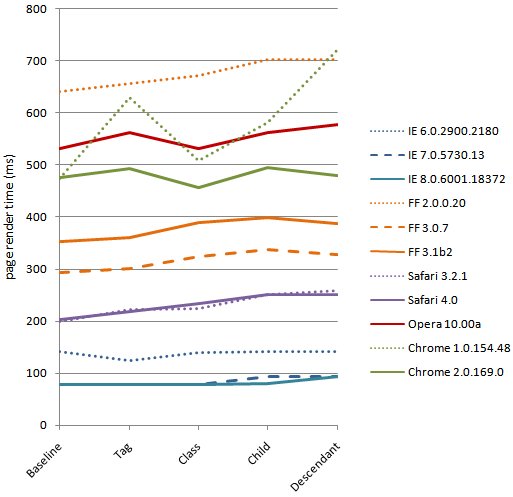
Performance varies across browsers; strangely, two new browsers, IE 8 and Firefox 3.1, are the slowest but comparisons should not be made from one browser to another. Although all the tests for a given browser were conducted on a single PC, different browsers might have been tested on different PCs with different performance characteristics. The goal of this experiment is not to compare browser performance – it’s to see how browsers handle progressively more complex CSS selectors.
[Revision: On further inspection comparing Firefox 3.0 and 3.1, I discovered that the test PC I used for testing Firefox 3.1 and IE 8 was slower than the other test PCs used in this experiment. I subsequently re-ran those tests as well as Firefox 3.0 and IE 7 on PCs that were more consistent and updated the chart above. Even with this re-run, because of possible differences in test hardware, do not use this data to compare one browser to another.]
Not surprisingly, the more complex pages (child selectors and descendant selectors) usually perform the worst. The biggest surprise is how small the delta is from the baseline to the most complex, worst performing test page. The average slowdown across all browsers is 50 ms, and if we look at the big ones (IE 6&7, FF3), the average delta is just 20 ms. For 70% or more of today’s users, improving these CSS selectors would only make a 20 ms improvement.
Keep in mind – these test pages are close to worst case. The 2000 anchors wrapped in P, DIV, DIV, DIV result in 6000 DOM elements – that’s twice as big as the max in the top ten sites. And the complex pages have 2000 extremely inefficient rules – a typical site has around one third of their rules that are complex child or descendant selectors. Facebook, for example, with the maximum number of rules at 2882 only has 750 that are these extremely inefficient rules.
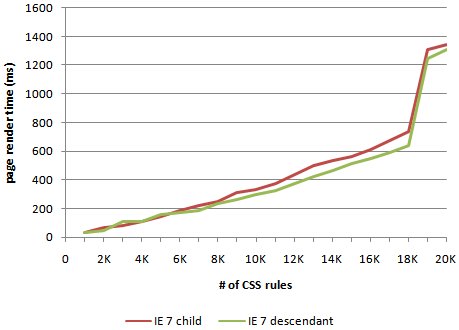
Why do the results from my tests suggest something different from what’s been said lately? One difference comes from looking at things at such a large scale. It’s okay to exaggerate test cases if the results are proportional to common use cases. But in this case, browsers behave differently when confronted with a 3 megabyte page with 60,000 elements and 20,000 rules. I especially noticed that my results were much different for IE 6&7. I wondered if there was a hockey stick in how IE handled CSS selectors. To investigate this I loaded the child selector and descendant selector pages with increasing number of anchors and rules, from 1000 to 20,000. The results, shown in the chart below, reveal that IE hits a cliff around 18,000 rules. But when IE 6&7 work on a page that is closer to reality, as in my tests, they’re actually the fastest performers.
Based on these tests I have the following hypothesis: For most web sites, the possible performance gains from optimizing CSS selectors will be small, and are not worth the costs. There are some types of CSS rules and interactions with JavaScript that can make a page noticeably slower. This is where the focus should be. So I’m starting to collect real world examples of small CSS style-related issues (offsetWidth, :hover) that put the hurt on performance. If you have some, send them my way. I’m speaking at SXSW this weekend. If you’re there, and want to discuss CSS selectors, please find me. It’s important that we’re all focusing on the performance improvements that our users will really notice.
John Resig: Drop-in JavaScript Performance
I wrote a post on the Google Code Blog about John Resig’s tech talk “Drop-in JavaScript Performance.” The video and slides are now available.
In this talk, John starts off highlighting why performance will improve in the next generation of browsers, thanks to advances in JavaScript engines and new features such as process per tab and parallel script loading. He digs deeper into JavaScript performance, touching on shaping, tracing, just-in-time compilation, and the various benchmarks (SunSpider, Dromaeo, and V8 benchmark). John plugs my UA Profiler, with its tests for simultaneous connections, parallel script loading, and link prefetching. He wraps up with a collection of many other advanced features in the areas of communiction, DOM, styling, data, and measurements.
Coupling asynchronous scripts
This post is based on a chapter from Even Faster Web Sites, the follow-up to High Performance Web Sites. Posts in this series include: chapters and contributing authors, Splitting the Initial Payload, Loading Scripts Without Blocking, Coupling Asynchronous Scripts, Positioning Inline Scripts, Sharding Dominant Domains, Flushing the Document Early, Using Iframes Sparingly, and Simplifying CSS Selectors.
Much of my recent work has been around loading external scripts asynchronously. When scripts are loaded the normal way (<script src="...">) they block all other downloads in the page and any elements below the script are blocked from rendering. This can be seen in the Put Scripts at the Bottom example. Loading scripts asynchronously avoids this blocking behavior resulting in a faster loading page.
One issue with async script loading is dealing with inline scripts that use symbols defined in the external script. If the external script is loading asynchronously without thought to the inlined code, race conditions may result in undefined symbol errors. It’s necessary to ensure that the async external script and the inline script are coupled in such a way that the inlined code isn’t executed until after the async script finishes loading.
There are a few ways to couple async scripts with inline scripts.
- window’s onload – The inlined code can be tied to the window’s onload event. This is pretty simple to implement, but the inlined code won’t execute as early as it could.
- script’s onreadystatechange – The inlined code can be tied to the script’s onreadystatechange and onload events. (You need to implement both to cover all popular browsers.) This code is lengthier and more complex, but ensures that the inlined code is called as soon as the script finishes loading.
- hardcoded callback – The external script can be modified to explicitly kickoff the inlined script through a callback function. This is fine if the external script and inline script are being developed by the same team, but doesn’t provide the flexibility needed to couple 3rd party scripts with inlined code.
In this blog post I talk about two parallel (no pun intended) issues: how async scripts make the page load faster, and how async scripts and inline scripts can be coupled using a variation of John Resig’s Degrading Script Tags pattern. I illustrate these through a recent project I completed to make the UA Profiler results sortable. I did this using Stuart Langridge’s sorttable script. It took me ~5 minutes to add his script to my page and make the results table sortable. With a little more work I was able to speed up the page by more than 30% by using the techniques of async script loading and coupling async scripts.
Normal Script Tags
I initially added Stuart Langridge’s sorttable script to UA Profiler in the typical way (<script src="...">), as seen in the Normal Script Tag implementation. The HTTP waterfall chart is shown in Figure 1.

Figure 1: Normal Script Tags HTTP waterfall chart
The table sorting worked, but I wasn’t happy with how it made the page slower. In Figure 1 we see how my version of the script (called “sorttable-async.js”) blocks the only other HTTP request in the page (“arrow-right-20×9.gif”), which makes the page load more slowly. These waterfall charts were captured using Firebug 1.3 beta. This new version of Firebug draws a vertical red line where the onload event occurs. (The vertical blue line is the domcontentloaded event.) For this Normal Script Tag version, onload fires at 487 ms.
Asynchronous Script Loading
The “sorttable-async.js” script isn’t necessary for the initial rendering of the page – sorting columns is only possible after the table has been rendered. This situation (external scripts that aren’t used for initial rendering) is a prime candidate for asynchronous script loading. The Asynchronous Script Loading implementation loads the script asynchronously using the Script DOM Element approach:
var script = document.createElement('script');
script.src = "sorttable-async.js";
script.text = "sorttable.init()"; // this is explained in the next section
document.getElementsByTagName('head')[0].appendChild(script);
The HTTP waterfall chart for this Asynchronous Script Loading implementation is shown in Figure 2. Notice how using an asynchronous loading technique avoids the blocking behavior – “sorttable-async.js” and “arrow-right-20×9.gif” are loaded in parallel. This pulls in the onload time to 429 ms.

Figure 2: Asynchronous Script Loading HTTP waterfall chart
John Resig’s Degrading Script Tags Pattern
The Asynchronous Script Loading implementation makes the page load faster, but there is still one area for improvement. The default sorttable implementation bootstraps itself by attaching “sorttable.init()” to the onload handler. A performance improvement would be to call “sorttable.init()” in an inline script to bootstrap the code as soon as the external script was done loading. In this case, the “API” I’m using is just one function, but I wanted to try a pattern that would be flexible enough to support a more complex situation where the module couldn’t assume what API was going to be used.
I previously listed various ways that an inline script can be coupled with an asynchronously loaded external script: window’s onload, script’s onreadystatechange, and hardcoded callback. Instead, I used a technique derived from John Resig’s Degrading Script Tags pattern. John describes how to couple an inline script with an external script, like this:
<script src="jquery.js">
jQuery("p").addClass("pretty");
</script>
The way his implementation works is that the inlined code is only executed after the external script is done loading. There are several benefits to coupling inline and external scripts this way:
- simpler – one script tag instead of two
- clearer – the inlined code’s dependency on the external script is more obvious
- safer – if the external script fails to load, the inlined code is not executed, avoiding undefined symbol errors
It’s also a great pattern to use when the external script is loaded asynchronously. To use this technique, I had to change both the inlined code and the external script. For the inlined code, I added the third line shown above that sets the script.text property. To complete the coupling, I added this code to the end of “sorttable-async.js”:
var scripts = document.getElementsByTagName("script");
var cntr = scripts.length;
while ( cntr ) {
    var curScript = scripts[cntr-1];
    if ( -1 != curScript.src.indexOf('sorttable-async.js') ) {
        eval( curScript.innerHTML );
        break;
    }
    cntr--;
}
This code iterates over all scripts in the page until it finds the script block that loaded itself (in this case, the script with src containing “sorttable-async.js”). It then evals the code that was added to the script (in this case, “sorttable.init()”) and thus bootstraps itself. (A side note: although the line of code was added using the script’s text property, here it’s referenced using the innerHTML property. This is necessary to make it work across browsers.) With this optimization, the external script loads without blocking other resources, and the inlined code is executed as soon as possible.
Lazy Loading
The load time of the page can be improved even more by lazyloading this script (loading it dynamically as part of the onload handler). The code behind this Lazyload version just wraps the previous code within the onload handler:
window.onload = function() {
    var script = document.createElement('script');
    script.src = "sorttable-async.js";
    script.text = "sorttable.init()";
    document.getElementsByTagName('head')[0].appendChild(script);
}
This situation absolutely requires this script coupling technique. The previous bootstrapping code that called “sorttable.init()” in the onload handler won’t be called here because the onload event has already passed. The benefit of lazyloading the code is that the onload time occurs even sooner, as shown in Figure 3. The onload event, indicated by the vertical red line, occurs at ~320 ms.

Figure 3: Lazyloading HTTP waterfall chart
Conclusion
Loading scripts asynchronously and lazyloading scripts improve page load times by avoiding the blocking behavior that scripts typically cause. This is shown in the different versions of adding sorttable to UA Profiler:
- Normal Script Tags – 487 ms
- Asynchronous Script Loading – 429 ms
- Lazyloading – ~320 ms
The times above indicate when the onload event occurred. For other web apps, improving when the asynchronously loaded functionality is attached might be a higher priority. In that case, the Asynchronous Script Loading version is slightly better (~400 ms versus 417 ms). In both cases, being able to couple inline scripts with the external script is a necessity. The technique shown here is a way to do that while also improving page load times.
State of Performance 2008
My Stanford class, CS193H High Performance Web Sites, ended last week. The last lecture was called “State of Performance”. This was my review of what happened in 2008 with regard to web performance, and my predictions and hopes for what we’ll see in 2009. You can see the slides (ppt, GDoc), but I wanted to capture the content here with more text. Let’s start with a look back at 2008.
2008
- Year of the Browser
- This was the year of the browser. Browser vendors have put users first, competing to make the web experience faster with each release. JavaScript got the most attention. WebKit released a new interpreter called Squirrelfish. Mozilla came out with Tracemonkey – Spidermonkey with Trace Trees added for Just-In-Time (JIT) compilation. Google released Chrome with the new V8 JavaScript engine. And new benchmarks have emerged to put these new JavaScript engines through the paces: Sunspider, V8 Benchmark, and Dromaeo.
In addition to JavaScript improvements, browser performance was boosted in terms of how web pages are loaded. IE8 Beta came out with parallel script loading, where the browser continues parsing the HTML document while downloading external scripts, rather than blocking all progress like most other browsers. WebKit, starting with version 526, has a similar feature, as does Chrome 0.5 and the most recent Firefox nightlies (Minefield 3.1). On a similar note, IE8 and Firefox 3 both increased the number of connections opened per server from 2 to 6. (Safari and Opera were already ahead with 4 connections per server.) (See my original blog posts for more information: IE8 speeds things up, Roundup on Parallel Connections, UA Profiler and Google Chrome, and Firefox 3.1: raising the bar.)
- Velocity
- Velocity 2008, the first conference focused on web performance and operations, launched June 23-24. Jesse Robbins and I served as co-chairs. This conference, organized by O’Reilly, was densely packed – both in terms of content and people (it sold out!). Speakers included John Allspaw (Flickr), Luiz Barroso (Google), Artur Bergman (Wikia), Paul Colton (Aptana), Stoyan Stefanov (Yahoo!), Mandi Walls (AOL), and representatives from the IE and Firefox teams. Velocity 2009 is slated for June 22-24 in San Jose and we’re currently accepting speaker proposals.
- Jiffy
- Improving web performance starts with measuring performance. Measurements can come from a test lab using tools like Selenium and Watir. To get measurements from geographically dispersed locations, scripted tests are possible through services like Keynote, Gomez, Webmetrics, and Pingdom. But the best data comes from measuring real user traffic. The basic idea is to measure page load times using JavaScript in the page and beacon back the results. Many web companies have rolled their own versions of this instrumentation. It isn’t that complex to build from scratch, but there are a few gotchas and it’s inefficient for everyone to reinvent the wheel. That’s where Jiffy comes in. Scott Ruthfield and folks from Whitepages.com released Jiffy at Velocity 2008. It’s Open Source and easy to use. If you don’t currently have real user load time instrumentation, take a look at Jiffy.
- JavaScript: The Good Parts
- Moving forward, the key to fast web pages is going to be the quality and performance of JavaScript. JavaScript luminary Doug Crockford helps lights the way with his book JavaScript: The Good Parts, published by O’Reilly. More is needed! We need books and guidelines for performance best practices and design patterns focused on JavaScript. But Doug’s book is a foundation on which to build.
- smush.it
- My former colleagues from the Yahoo! Exceptional Performance team, Stoyan Stefanov and Nicole Sullivan, launched smush.it. In addition to a great name and beautiful web site, smush.it packs some powerful functionality. It analyzes the images on a web page and calculates potential savings from various optimizations. Not only that, it creates the optimized versions for download. Try it now!
- Google Ajax Libraries API
- JavaScript frameworks are powerful and widely used. Dion Almaer and the folks at Google saw an opportunity to help the development community by launching the Ajax Libraries API. This service hosts popular frameworks including jQuery, Prototype, script.aculo.us, MooTools, Dojo, and YUI. Web sites using any of these frameworks can reference the copy hosted on Google’s worldwide server network and gain the benefit of faster downloads and cross-site caching. (Original blog post: Google AJAX Libraries API.)
- UA Profiler
- Okay, I’ll get a plug for my own work in here. UA Profiler looks at browser characteristics that make pages load faster, such as downloading scripts without blocking, max number of open connections, and support for “data:†URLs. The tests run automatically – all you have to do is navigate to the test page from any browser with JavaScript support. The results are available to everyone, regardless of whether you’ve run the tests. I’ve been pleased with the interest in UA Profiler. In some situations it has identified browser regressions that developers have caught and fixed.
2009
Here’s what I think and hope we’ll see in 2009 for web performance.
- Visibility into the Browser
- Packet sniffers (like HTTPWatch, Fiddler, and WireShark) and tools like YSlow allow developers to investigate many of the “old school” performance issues: compression, Expires headers, redirects, etc. In order to optimize Web 2.0 apps, developers need to see the impact of JavaScript and CSS as the page loads, and gather stats on CPU load and memory consumption. Eric Lawrence and Christian Stockwell’s slides from Velocity 2008 give a hint of what’s possible. Now we need developer tools that show this information.

- Think “Web 2.0”
- Web 2.0 pages are often developed with a Web 1.0 mentality. In Web 1.0, the amount of CSS, JavaScript, and DOM elements on your page was more tolerable because it would be cleared away with the user’s next action. That’s not the case in Web 2.0. Web 2.0 apps can persist for minutes or even hours. If there are a lot of CSS selectors that have to be parsed with each repaint -Â that pain is felt again and again. If we include the JavaScript for all possible user actions, the size of JavaScript bloats and increases memory consumption and garbage collection. Dynamically adding elements to the DOM slows down our CSS (more selector matching) and JavaScript (think getElementsByTagName). As developers, we need to develop a new way of thinking about the shape and behavior of our web apps in a way that addresses the long page persistence that comes with Web 2.0.
- Speed as a Feature
- In my second month at Google I was ecstatic to see the announcement that landing page load time was being incorporated into the quality score used by Adwords. I think we’ll see more and more that the speed of web pages will become more important to users, more important to aggregators and vendors, and subsequently more important to web publishers.
- Performance Standards
- As the industry becomes more focused on web performance, a need for industry standards is going to arise. Many companies, tools, and services measure “response time”, but it’s unclear that they’re all measuring the same thing. Benchmarks exist for the browser JavaScript engines, but benchmarks are needed for other aspects of browser performance, like CSS and DOM. And current benchmarks are fairly theoretical and extreme. In addition, test suites are needed that gather measurements under more real world conditions. Standard libraries for measuring performance are needed, a la Jiffy, as well as standard formats for saving and exchanging performance data.
- JavaScript Help
- With the emergence of Web 2.0, JavaScript is the future. The Catch-22 is that JavaScript is one of the biggest performance problems in a web page. Help is needed so JavaScript-heavy web pages can still be fast. One specific tool that’s needed is something that takes a monolithic JavaScript payload and splits into smaller modules, with the necessary logic to know what is needed when. Doloto is a project from Microsoft Research that tackles this problem, but it’s not available publicly. Razor Optimizer attacks this problem and is a good first step, but it needs to be less intrusive to incorporate this functionality.
Browsers also need to make it easier for developers to load JavaScript with less of a performance impact. I’d like to see two new attributes for the SCRIPT tag: DEFER and POSTONLOAD. DEFER isn’t really “new” – IE has had the DEFER attribute since IE 5.5. DEFER is part of the HTML 4.0 specification, and it has been added to Firefox 3.1. One problem is you can’t use DEFER with scripts that utilize document.write, and yet this is critical for mitigating the performance impact of ads. Opera has shown that it’s possible to have deferred scripts still support document.write. This is the model that all browsers should follow for implementing DEFER. The POSTONLOAD attribute would tell the browser to load this script after all other resources have finished downloading, allowing the user to see other critical content more quickly. Developers can work around these issues with more code, but we’ll see wider adoption and more fast pages if browsers can help do the heavy lifting.
- Focus on Other Platforms
- Most of my work has focused on the desktop browser. Certainly, more best practices and tools are needed for the mobile space. But to stay ahead of where the web is going we need to analyze the user experience in other settings including automobile, airplane, mass transit, and 3rd world. Otherwise, we’ll be playing catchup after those environments take off.
- Fast by Default
- I enjoy Tom Hanks’ line in A League of Their Own when Geena Davis (“Dottie”) says playing ball got too hard: “It’s supposed to be hard. If it wasn’t hard, everyone would do it. The hard… is what makes it great.” I enjoy a challenge and tackling a hard problem. But doggone it, it’s just too hard to build a high performance web site. The bar shouldn’t be this high. Apache needs to turn off ETags by default. WordPress needs to cache comments better. Browsers need to cache SSL responses when the HTTP headers say to. Squid needs to support HTTP/1.1. The world’s web developers shouldn’t have to write code that anticipates and fixes all of these issues.
Good examples of where we can go are Runtime Page Optimizer and Strangeloop appliances. RPO is an IIS module (and soon Apache) that automatically fixes web pages as they leave the server to minify and combine JavaScript and stylesheets, enable CSS spriting, inline CSS images, and load scripts asynchronously. (Original blog post: Runtime Page Optimizer.) The web appliance from Strangeloop does similar realtime fixes to improve caching and reduce payload size. Imagine combining these tools with smush.it and Doloto to automatically improve the performance of web pages. Companies like Yahoo! and Google might need more customized solutions, but for the other 99% of developers out there, it needs to be easier to make pages fast by default.
This is a long post, but I still had to leave out a lot of performance highlights from 2008 and predictions for what lies ahead. I look forward to hearing your comments.
The Art of Capacity Planning

This week I opened a beautiful package from O’Reilly. It contained John Allspaw’s new book, The Art of Capacity Planning. As you can see, the cover is a delight to look at. But you shouldn’t judge a book by it’s cover! Luckily, what’s inside the book is also a delight.
Now, let me make a disclaimer. I know John. We first crossed paths at Yahoo!, and have worked together on some side projects, most notably the Velocity conference. I know he’s an expert in the area of capacity planning. I know he’s highly regarded by other leaders in the operations space. I’ve heard him speak at conferences, brainstorm in small group discussions, and share his experiences with others. Given this background, I expected a book full of lessons learned, practical advice, and real world takeaways. Thankfully, for all of us readers, The Art of Capacity Planning delivers all of this and more.
Right out of the gate, John covers a topic near and dear to my heart: metrics. His advice? “Measure, measure, measure.” John reinforces this by including an incredible number of charts throughout the book. He goes on to say that our measurement tools need to provide an easy way to:
- Record and store data over time
- Build custom metrics
- Compare metrics from various sources
- Import and export metrics
As I read the book, I found myself nodding and thinking, “yes, yes, this is exactly what I learned!” Although it’s been more than five years since I was buildmaster for My Yahoo!, I really resonated with the advice John provides, like this one: “Homogenize hardware to halt headaches”. (You have to love the alliteration, too.)
In a thin book that’s easy to read, John covers a large number of topics. He talks about load testing, with pointers to tools like Httperf and Siege. There are several sections that talk about caching architectures and the use of Squid. He provides guidelines when it comes to deployment, such as making all changes happen in one place, the importance of defining roles and services, and ensuring new servers start working automatically. At the end he even manages to cover virtualization and cloud computing, and how they come into play during capacity planning.
The Art of Capacity Planning is full of sage advice from a seasoned veteran, like this one: “The moral of this little story? When faced with the question of capacity, try to ignore those urges to make existing gear faster, and focus instead on the topic at hand: finding out what you need, and when.” When I read a technical book, I’m really looking for takeaways. That’s why I loved The Art of Capacity Planning, and I think you will, too.