
Request Timeout
With the increase in 3rd party content on websites, I’ve evangelized heavily about how Frontend SPOF blocks the page from rendering. This is timely given the recent Doubleclick outage. Although I’ve been warning about Frontend SPOF for years, I’ve never measured how long a hung response blocks rendering. I used to think this depended on the browser, but Pat Meenan recently mentioned he thought it depended more on the operating system. So I decided to test it.
My test page contains a request for a script that will never return. This is done using Pat’s blackhole server. Eventually the request times out and the page will finish loading. Thus the amount of time this takes is captured by measuring window.onload. I tweeted asking people to run the test and collected the results in a Browserscope user test.
The aggregated results show the median timeout value (in seconds) for each type of browser. Unfortunately, this doesn’t reflect operating system. Instead, I exported the raw results and did some UA parsing to extract an approximation for OS. The final outcome can be found in this Google Spreadsheet of Blackhole Request Timeout values.
Sorting this by OS we see that Pat was generally right. Here are median timeout values by OS:
- Android: ~60 seconds
- iOS: ~75 seconds
- Mac OS: ~75 seconds
- Windows: ~20 seconds
The timeout values above are independent of browser. For example, on Mac OS the timeout value is ~75 seconds for Chrome, Firefox, Opera, and Safari.
However, there are a lot of outliers. Ilya Grigorik points out that there are a lot of variables affecting when the request times out; in addition to browser and OS, there may be server and proxy settings that factor into the results. I also tested with my mobile devices and got different results when switching between carrier network and wifi.
The results of this test show that there are more questions to be answered. It would take someone like Ilya with extensive knowledge of browser networking to nail down all the factors involved. A general guideline is Frontend SPOF from a hung response ranges from 20 to 75 seconds depending on browser and OS.
Domain Sharding revisited
With the adoption of SPDY and progress on HTTP 2.0, I hear some people referring to domain sharding as a performance anti-pattern. I disagree. Sharding resources across multiple domains is a major performance win for many websites. However, there is room for debate. Domain sharding isn’t appropriate for everyone. It may hurt performance if done incorrectly. And it’s utility might be short-lived. Is it worth sharding domains? Let’s take a look.
Compelling Data
The HTTP Archive has a field call “maxDomainReqs”. The explanation requires a few sentences: Websites request resources from various domains. The average website today accesses 16 different domains as shown in the chart below. That number has risen from 12.5 a year ago. That’s not surprising given the rise in third party content (ads, widgets, analytics).
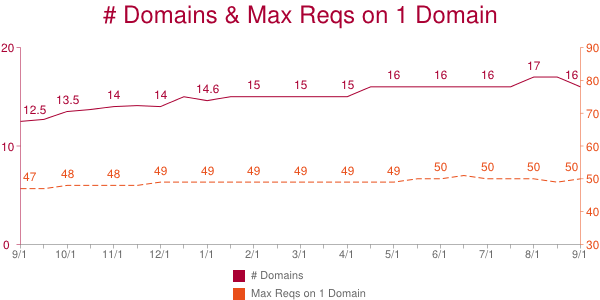
The HTTP Archive counts the number of requests made on each domain. The domain with the most requests is the “max domain” and the number of requests on that domain is the “maxDomainReqs”. The average maxDomainReqs value has risen from 47 to 50 over the past year. That’s not a huge increase, but the fact that the average number of requests on one domain is so high is startling.
50 is the average maxDomainReqs across the world’s top 300K URLs. But averages don’t tell the whole story. Using the HTTP Archive data in BigQuery and bigqueri.es, both created by Ilya Grigorik, it’s easy to find percentile values for maxDomainReqs: the 50th percentile is 39, the 90th percentile is 97, and the 95th percentile is 127 requests on a single domain.
This data shows that a majority of websites have 39 or more resources being downloaded from a single domain. Most browsers do six requests per hostname. If we evenly distribute these 39 requests across the connections, each connection must do 6+ sequential requests. Response times per request vary widely, but I use 500 ms as an optimistic estimate. If we use 500 ms as the typical responsive time, this introduces a 3000 ms long pole in the response time tent. In reality, requests are assigned to whatever connection is available, and 500 ms might not be the typical response time for your requests. But given the six-connections-per-hostname limit, 39 requests on one domain is a lot.
Wrong sharding
There are costs to domain sharding. You’ll have to modify your website to actually do the sharding. This is likely a one time cost; the infrastructure only has to be setup once. In terms of performance the biggest cost is the extra DNS lookup for each new domain. Another performance cost is the overhead of establishing each TCP connection and ramping up its congestion window size.
Despite these costs, domain sharding has great benefit for websites that need it and do it correctly. That first part is important – it doesn’t make sense to do domain sharding if your website has a low “maxDomainReqs” value. For example, if the maximum number of resources downloaded on a single domain is 6, then you shouldn’t deploy domain sharding. With only 6 requests on a single domain, most browsers are able to download all 6 in parallel. On the other hand, if you have 39 requests on a single domain, sharding is probably a good choice. So where’s the cutoff between 6 and 39? I don’t have data to answer this, but I would say 20 is a good cutoff. Other aspects of the page affect this decision. For example, if your page has a lot of other requests, then those 20 resources might not be the long pole in the tent.
The success of domain sharding can be mitigated if it’s done incorrectly. It’s important to keep these guidelines in mind.
- It’s best to shard across only two domains. You can test larger values, but previous tests show two to be the optimal choice.
- Make sure that the sharding logic is consistent for each resource. You don’t want a single resource, say main.js, to flip-flop between domain1 and domain2.
- You don’t need to setup different servers for each domain – just create CNAMEs. The browser doesn’t care about the final IP address – it only cares that the hostnames are different.
These and other issues are explained in more detail in Chapter 11 of Even Faster Web Sites.
Short term hack?
Perhaps the strongest argument against domain sharding is that it’s unnecessary in the world of SPDY (as well as HTTP 2.0). In fact, domain sharding probably hurts performance under SPDY. SPDY supports concurrent requests (send all the request headers early) as well as request prioritization. Sharding across multiple domains diminishes these benefits. SPDY is supported by Chrome, Firefox, Opera, and IE 11. If your traffic is dominated by those browsers, you might want to skip domain sharding. On the other hand, IE 6&7 are still somewhat popular and only support 2 connections per hostname, so domain sharding is an even bigger win in those browsers.
A middle ground is to alter domain sharding depending on the client: 1 domain for browsers that support SPDY, 2 domains for non-SPDY modern browsers, 3-4 domains for IE 6-7. This makes domain sharding harder to deploy. It also lowers the cache hit rate on intermediate proxies.
There’s no need for domain sharding in the world of HTTP 2.0 across all popular browsers. Until then, there’s no silver bullet answer. But if you’re one of the websites with 39+ resources on a single hostname, domain sharding is worth exploring.
Redirect caching deep dive
I was talking to a performance guru today who considers redirects one of the top two performance problems impacting web pages today. (The other was document.write.) I agree redirects are an issue, so much so that I wrote a chapter on avoiding redirects in High Performance Web Sites. What makes matters worse is that, even though redirects are cacheable, most browsers (even the new ones) don’t cache them.
Another performance guru, Eric Lawrence, sent me an email last week pointing out how cookies, status codes, and response headers affect redirect caching. Even though there are a few redirect tests in Browserscope, they don’t test all of these conditions. I wanted a more thorough picture of the state of redirect caching across browsers.
The Redirect Caching Tests page provides a test harness for exercising different redirect caching scenarios.
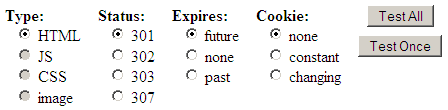
You can use the “Test Once” button to test a specific scenario, but if you choose “Test All” the harness runs through all the tests and offers to post the results (anonymously) to Browserscope. Here’s a snapshot of the results:
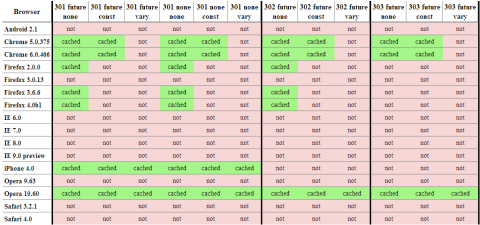
I realize you can’t read the results, but suffice it to say red is bad. If you click on the table you’ll go to the full results. They’re broken into two tables: redirects that should be cached, and redirects that should not be cached. For example, a 301 response with an expiration date in the future should be cached, but a 302 redirect with an expiration date in the past shouldn’t be cached. The official ruling can be found in RFC 2616. (Also, discussions Eric had with Mark Nottingham, chair of the Httpbis working group, indicate that 303 redirects with a future expiration date should be cached.)
Chrome, iPhone, and Opera 10.60 are doing the best job, but there’s still a lot of missed opportunities. IE 9 platform preview 3 still doesn’t cache any redirects, but Eric’s blog post, Caching Improvements in Internet Explorer 9, describes how that’ll be in the final version of IE9. If you use redirects that don’t change, make sure to use a 301 status code and set an expiration date in the future. That will ensure they’re cached in Chome, Firefox, iPhone, Opera, and IE9.
Please help out by running the test on your browser (especially mobile!) and contributing the results back to Browserscope so we can help browser vendors know what needs to be fixed.
Velocity: TCP and the Lower Bound of Web Performance
John Rauser (Amazon) was my favorite speaker at Velocity. His keynote on Creating Cultural Change was great. I recommend you watch the video.
John did another session that was longer and more technical entitled TCP and the Lower Bound of Web Performance. Unfortunately this wasn’t scheduled in the videotape room. But yesterday Mike Bailey contacted me saying he had recorded the talk with his Flip. With John’s approval, Mike has uploaded his video of John Rauser’s TCP talk from Velocity. This video runs out before the end of the talk, so make sure to follow along in the slides so you can walk through the conclusion yourself. [Update: Mike Bailey uploaded the last 7 minutes, so now you can hear the conclusion directly from John!]
John starts by taking a stab at what we should expect for coast-to-coast roundtrip latency:
- Roundtrip distance between the west coast and the east coast is 7400 km.
- The speed of light in a vacuum is 299,792.458 km/second.
- So the theoretical minimum for roundtrip latency is 25 ms.
- But light’s not traveling in a vacuum. It’s propagating in glass in fiber optic cables.
- The index of refraction of glass is 1.5, which means light travels at 66% of the speed in glass that it does in a vacuum.
- So a more realistic roundtrip latency is ~37 ms.
- Using a Linksys wireless router and a Comcast cable connection, John’s roundtrip latency is ~90ms. Which isn’t really that bad, given the other variables involved.
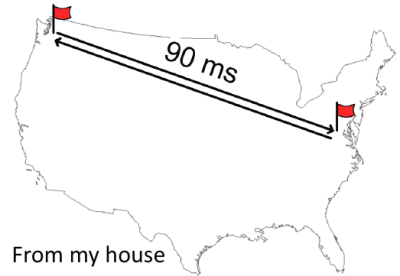
The problem is it’s been like this for well over a decade. This is about the same latency that Stuart Cheshire found in 1996. This is important because as developers we know that network latency matters when it comes to building a responsive web app.
With that backdrop, John launches into a history of TCP that leads us to the current state of network latency. The Internet was born in September of 1981 with RFC 793 documenting the Transmission Control Protocol, better known as TCP.
Given the size of the TCP window (64 kB) there was a chance for congestion, as noted in Congestion Control in IP/TCP Internetworks (RFC 896):
Should the round-trip time exceed the maximum retransmission interval for any host, that host will begin to introduce more and more copies of the same datagrams into the net. The network is now in serious trouble. Eventually all available buffers in the switching nodes will be full and packets must be dropped. Hosts are sending each packet several times, and eventually some copy of each packet arrives at its destination. This is congestion collapse.
This condition is stable. Once the saturation point has been reached, if the algorithm for selecting packets to be dropped is fair, the network will continue to operate in a degraded condition. Congestion collapse and pathological congestion are not normally seen in the ARPANET / MILNET system because these networks have substantial excess capacity.
Although it’s true that in 1984, when RFC 896 was written, the Internet had “substantial excess capacity”, that quickly changed. In 1981 there were 213 hosts on the Internet. But the number of hosts started growing rapidly. In October of 1986, with over 5000 hosts on the Internet, there occurred the first in a series of congestion collapse events.

This led to the development of the TCP slow start algorithm, as described in RFCs 2581, 3390, and 1122. The key to this algorithm is the introduction of a new concept called the congestion window (cwnd) which is maintained by the server. The basic algorithm is:
- initalize cwnd to 3 full segments
- increment cwnd by one full segment for each ACK
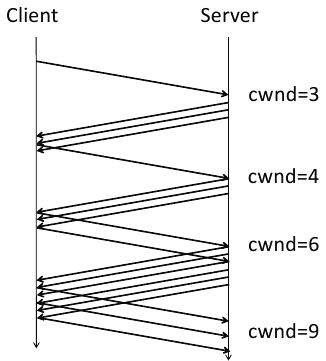
TCP slow start was widely adopted. As seen in the following packet flow diagram, the number of packets starts small and doubles, thus avoiding the congestion collision experienced previously.
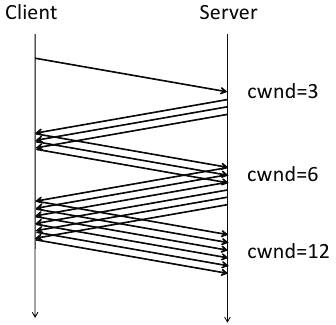
There were still inefficiencies, however. In some situations, too many ACKs would be sent. Thus we now have the delayed ACK algorithm from RFC 813. So the nice packet growth seen above now looks like this:
At this point, after referencing so many RFCs and showing numerous ACK diagrams, John aptly asks, “Why should we care?” Sadly, the video stops at this point around slide 160. But if we continue through the slides we see how John brings us back to what web developers deal with on a daily basis.
Keeping in mind that the size of a segment is 1460 bytes (“1500 octets” as specified in RFC 894 minus 40 bytes for TCP and IP headers), we see how many roundtrips are required to deliver various payload sizes. (I overlaid a kB conversion in red.)
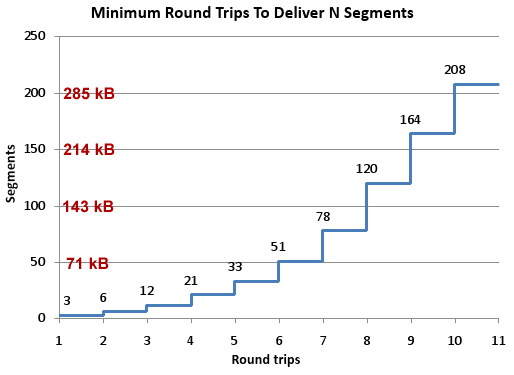
John’s conclusion is that “TCP slow start means that network latency strictly limits the throughput of fresh connections.” He gives these recommendations for what can be done about the situation:
- Carefully consider every byte of content
- Think about what goes into those first few packets
- 2.1 Keep your cookies small
- 2.2 Open connections for assets in the first three packets
- 2.3 Download small assets first
- Accept the speed of light (move content closer to users)
All web developers need at least a basic understanding of the protocol used by their apps. John delivers a great presentation that is informative and engaging, with real takeaways. Enjoy!
Fewer requests through resource packages
A few months back, I visited Alexander Limi at the Mozilla offices to discuss his proposal for resource packages. I liked the idea then and am excited that he has published the proposal in his article Making browsers faster: Resource Packages. I’ll start by reviewing the concept, provide my comments on some of the issues that have come up, and then provide some data on how this would impact the Alexa U.S. top 10 web sites in terms of HTTP requests.
Over the last few years I’ve talked with several people about the concept of bundling multiple resources into a single response, with the ultimate goal being to increase bandwidth utilization on the client. Typically, browsers only take advantage of about 30% of their bandwidth capacity when loading a web page because of the overhead of HTTP and TCP, and the various blocking behaviors in browsers. These previous resource bundling discussions got waylaid by implementation details and deployment challenges. The strength of Alexander’s proposal is its simplicity around these two tenets:
- the resource package is a zip file – Zip files have widespread support, are easy to create, require low CPU to zip and unzip, and are well understood by developers and users.
- the implementation is transparent to browsers that don’t support it – Developers can add resource packages to their existing pages with a LINK tag using the “resource-package” relationship. Browsers that don’t recognize “resource-package” LINKs (which is all browsers right now), ignore it and load the page the same way they do today. As browsers start to support “resource-package” LINKs, users start getting faster pages. Developers only have to create one version of their HTML.
These are simple principles, but they are why this proposal stands out.
How It Would Work
The first step is to identify which resources to bundle. There’s no simple recipe for doing this. It’s similar to figuring out which images to sprite, or which scripts to concatenate together. You have to look across your web pages and see if there is a core set of resources that are used over and over – rounded corners, logos, core JavaScript and CSS files, etc. You don’t want to bundle every image, script, and stylesheet across all your pages into one resource package. Similarly, you don’t want to create a separate resource package for every page – it’s wasteful to have the same resources repeated across multiple packages. Take the middle path.
The next step is to create a manifest.txt file that lists the resources, for example:
js/jquery.js
js/main.js
css/reset.css
css/grid.css

css/main.css

images/logo.gif

images/navbar.png
Then zip the manifest.txt and the files together.
Finally, add a line like this to your HTML document:
<link rel="resource-package" type="application/zip" href="pkg.zip" />This causes the browser to download the zip file, extract the files, and cache them. As the browser continues parsing the HTML page, it encounters other resources, such as:
<script src="js/jquery.js" type="text/javascript"></script>Browsers that don’t support resource packages would make a separate HTTP request for jquery.js. But browsers that support resource packages would already have jquery.js in cache, avoiding the need for any more HTTP requests. This is where the performance benefit is achieved.
Why? What about…?
To a large degree, bundling is possible today. Multiple scripts can be concatenated together. Similar story for stylesheets. Images can be sprited together. But even if you did all of this, you’d have three HTTP requests. Resource packages bundle all of these into one HTTP request. Also, although stylesheets are typically (hopefully) all in the document HEAD, you might have some scripts at the top of your HTML document and others at the bottom. You’d either have to bundle them all together at the top (and slow down your page for JavaScript that could have been loaded lower), or create two concatenated scripts. And even though I’ve created SpriteMe, creating sprites is still hard. Resource packages allow for files (scripts, stylesheets, images, etc.) to be developed and maintained separately, but more easily bundled for efficient download to the client.
Comments on various blogs and threads have raised concerns about resource packages hurting performance because they decrease parallel downloading. This should not be a concern. Worst case, developers could create two resource packages to get parallel downloading, but that won’t be necessary. I haven’t done the tests to prove it, but I believe downloading multiple resources across a single connection in streaming fashion will achieve greater bandwidth utilization than sharding resources across multiple domains for greater parallelization. Also, there will always be other resources that live outside the resource package. Jumping ahead a little bit, across the Alexa U.S. top 10 web sites, 37% of the resources in the page would not make sense to put into a resource package. So there will be plenty of opportunity for other downloads to happen in parallel.
Another advantage of zip files is that they can be unpacked as the bytes arrive. That’s where the manifest.txt comes in. By putting the manifest.txt first in the zip file, browsers can peel off the resources one-by-one and start acting on them immediately. But this means browsers are likely to block parsing the page until at least the manifest.txt has arrived (so that they know what to do when they encounter the next resource in the page). There are multiple reasons why this is not a concern.
- Some of the non-packaged resources could be placed above the resource package – presumably browsers would start those downloads before blocking for the resource package’s manifest.txt.
- The resource package’s LINK tag could (should) be included in the first part of the HTML document that is flushed early to the client, so the browser could start the request for the zip file even before the entire HTML document has arrived.
- A final idea that isn’t in the proposal – I’d like to consider adding the manifest to the HTML document. This would add page weight, but if manifest blocking was an issue developers could use this workaround.
- There should also be an ASYNC or DEFER attribute for resource packages that tells the browser not to wait. Again, only developers who felt this was an issue could choose this path.
My main issue with resource packages was giving up the granularity of setting caching headers for each resource individually. But as I thought about this, many web sites I look at version their resources today – giving them the same expiration dates. This was further confirmed during my examination of the top 10 sites (next section). If there are some resources that change frequently (less than weekly), they might be better in a separate resource package, or not packaged at all.
Survey of Resource Package Potential
I’m all about ideas that make a real impact. So I wanted to quantify how resource packages could be used in the real world. I examined the Alexa U.S. top 10 web sites and cataloged every resource that was downloaded. For each web site, I identified one or two domains that hosted the bulk of the resources. For the resources on those domains, I only included resources that had an expiration date at least one week in the future. Although you could package resources that weren’t cacheable, this would likely be a greater burden on the backend. It makes the most sense to package resources that are intended to be cached. The full details are available in this Google spreadsheet.
With this raw data in hand, I looked at the potential savings that could be achieved by using resource packages. On average, these websites have:
- 42 resources (separate HTTP requests)
- 26 of these would make sense to put into one or two resource packages
Using resource packages would drop the total number of HTTP requests on these sites from 42 to 17!
The results for each top 10 web site are shown in the following table. The last two columns show a size comparison. In the case of Amazon, for example, there were 73 HTTP requests for resources in the page. Of these, 47 were being downloaded from two main domains with a future expiration date, so could be put into a resource package. The download size of those 47 individual responses was 263K. After zipping them together, the size of the zip file was 232K.
| original # of requests |
# of requests packaged |
individual file size |
zip file size |
|
| Amazon | 73 | 47 | 263K | 232K |
| Bing | 20 | 11 | 33K | 30K |
| Blogger | 43 | 34 | 105K | 81K |
| eBay | 48 | 38 | 179K | 159K |
| 43 | 43 | 303K | 260K | |
| 11 | 8 | 29K | 25K | |
| MySpace | 41 | 10 | 39K | 35K |
| Wikipedia | 61 | 21 | 73K | 63K |
| Yahoo | 48 | 45 | 294K | 271K |
| YouTube | 27 | 5 | 78K | 71K |
| average | 42 | 26 | 140K | 123K |
This is a best case analysis. It’s possible some of these resources might be page-specific or short-lived, and thus not good candidates for packaging. Also, the zip file size does not include the manifest.txt file size, although this would be small.
Resource packages promise to greatly reduce the number of HTTP requests in web pages, producing pages that load faster. Once we have browsers that support this feature, the impact on page load times can be measured. I’m excited to hear from Alexander that Firefox 3.7 will support resource packages. I hope other browsers will comment on this proposal and support this performance feature.
SPeeDY – twice as fast as HTTP
Mike Belshe and Roberto Peon, both from Google, just published a post entitled A 2x Faster Web. The post talks about one of the most promising web performance initiatives in recent memory – an improvement of HTTP called SPDY (pronounced “SPeeDY”). The title of their blog post comes from the impact SPDY has on page load times:
The initial results are very encouraging: when we download the top 25 websites over simulated home network connections, we see a significant improvement in performance – pages loaded up to 55% faster.
SPDY is an application-layer protocol, as is HTTP. The team chose to work at this layer, rather than the transport-layer of TCP, because it’s easier to deploy and has more potential for performance gains. After all, it’s been 10 years since HTTP/1.1, the most common version in use today, was defined. The main enhancements included in SPDY are summed up in three bullets:
- Multiplexed requests – Multiple requests can be issued concurrently over a single SPDY connection.
- Prioritized requests – Clients can request certain resources to be delivered first, for example, stylesheets as a higher priority over images.
- Compressed headers – HTTP headers (User-Agent, cookies, etc.) represent a significant number of bytes and yet are not compressed, whereas in SPDY they are compressed.
The reason this is so exciting is because it’s an improvement to the Internet infrastructure. If SPDY is adopted by web browsers and servers, users will get a faster experience without requiring them or web developers to do any extra work. This is what I call “fast by default” and is the theme for Velocity 2010. We still need developers to build their web applications using performance best practices, but getting the basic building blocks of the Web to be as fast as possible is in a way easier to wrangle and has a wider reach.
The SPDY team has published a white paper and DRAFT protocol specification. I say “DRAFT” in all caps because this is a proposal. The team is actively looking for feedback. They’ve also released a SPDY-enabled version of Chrome, and will release an open-source web server that supports SPDY in the near future. Read the FAQ to find out more about how this relates to HTTP pipelining, TCP, SCTP, and more. (I’m not sure I buy their answer for how the name was chosen.)
This needs lots of review. Please take a look and send your feedback to the Chromium discussion group.
Update: Checkout follow-up articles from Mark Nottingham (Yahoo!, chair of the IETF HTTPBIS Working Group) and Alex Russell (Google, Dojo contributor, coined the term Comet).
Who’s not getting gzip?
The article Use compression to make the web faster from the Google Code Blog contains some interesting information on why modern browsers that support compression don’t get compressed responses in daily usage. The culprit?
anti-virus software, browser bugs, web proxies, and misconfigured web servers. The first three modify the web request so that the web server does not know that the browser can uncompress content. Specifically, they remove or mangle the Accept-Encoding header that is normally sent with every request.
This is hard to believe, but it’s true. Tony Gentilcore covers the full story in the chapter he wrote called “Going Beyond Gzipping” in my most recent book, including some strategies for correcting and working around the problem. (Check out Tony’s slides from Velocity 2009.) According to Tony:
a large web site in the United States should expect roughly 15% of visitors don’t indicate gzip compression support.
This blog post from Arvind Jain and Jason Glasgow contains additional information, including:
- Users suffering from this problem experience a Google Search page that is 25% slower – 1600ms for compressed content versus 2000ms for uncompressed.
- Google Search was able to force the content to be compressed (even though the browser didn’t request it), and improved page load times by 300ms.
- Internet Explorer 6 downgrades to HTTP/1.0 and drops the Accept-Encoding request header when behind a proxy. For Google Search, 36% of the search results sent without compression were for IE6.
Is there something about your browser, proxy, or anti-virus software that’s preventing you from getting compressed content and slowing you down 25%? Test it out by visiting the browser compression test page.
HTTP Archive Specification: Firebug and HttpWatch
A few years ago, I set a goal to foster the creation of an Internet Performance Archive. The idea is similar to the Internet Archive. But whereas the Internet Archive’s Wayback Machine provides a history of the Web’s state of HTML, IPA would provide a history of the Web’s state of performance: total bytes downloaded, number of images|scripts|stylesheets, use of compression, etc. as well as results from performance analysis tools like YSlow and Page Speed. Early versions of this idea can be seen in Show Slow and Cesium.
I realized that a key ingredient to this idea was a way to capture the page load experience, basically, a way to save what you see in a packet sniffer. Wayback Machine archives HTML, but it doesn’t capture critical parts of the page load experience like the page’s resources (scripts, stylesheets, etc.) and their HTTP headers. It’s critical to capture this information so that the performance results can be viewed in the context of what was actually loaded and analyzed.
What’s needed is an industry standard for archiving HTTP information. The first step in establishing that industry standard took place today with the announcement of HttpWatch and Firebug joint support of the HTTP Archive format.
HttpWatch has long supported exporting HTTP information. That’s one of the many reasons why it’s the packet sniffer I use almost exclusively. Earlier this year, as part of the Firebug Working Group, I heard that Firebug wanted to add an export capability for Net Panel. I suggested that, rather than create yet another proprietary format, Firebug team up with HttpWatch to develop a common format, and drive that forward as a proposal for an industry standard. I introduced Simon Perkins (HttpWatch) and Jan “Honza” Odvarko (main Net Panel developer), then stepped back as they worked together to produce today’s announcement.
The HTTP Archive format (HAR for short – that was my contribution ;-) is in JSON format. You can see it in action in HttpWatch 6.2, released today. HAR has been available in Firebug for a month or so. You need Firebug 1.5 alpha v26 or later and Honza’s NetExport add-on (v0.7b5 or later).
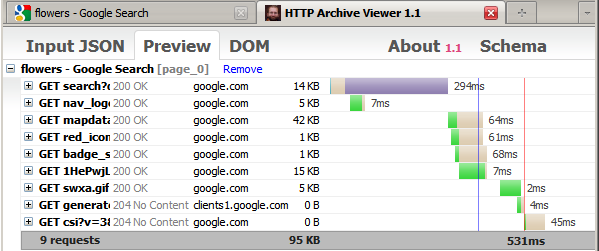
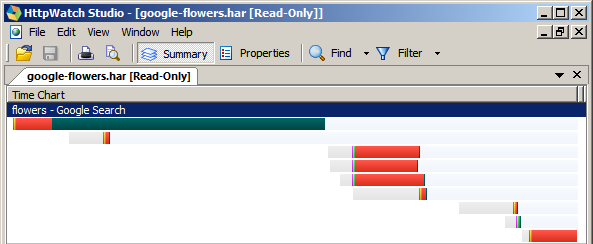
Here’s what the end-to-end workflow looks like. After installing NetExport, the “Export” button is added to Firebug Net Panel. Selecting this, I can save the HTTP information for my Google flowers search to a file called “google-flowers.har”.
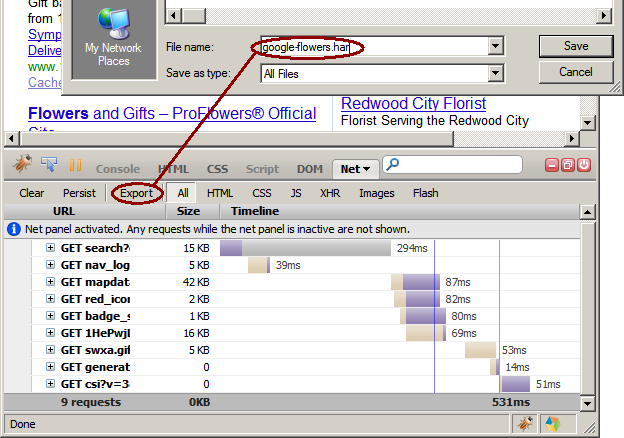
After saving the file, it’s automatically displayed in Honza’s HTTP Archive Viewer web page:
I can then open the file in HttpWatch:
I’m incredibly excited to see this milestone reached, thanks to the work of Honza and Simon. I encourage other vendors and projects to add support for HAR files. The benefits aren’t limited to performance analysis. Having a format for sharing HTTP data across tools and browsers is powerful for debugging and testing, as well. One more block added to the web performance foundation. Thank you HttpWatch and Firebug!
The skinny on cookies
I just finished Eric Lawrence’s post on Internet Explorer Cookie Internals. Eric works on the IE team as well as owning Fiddler. Everything he writes is worth reading. In this article he answers FAQs about how IE handles cookies, for example:
- If I don’t specify a leading dot when setting the DOMAIN attribute, IE doesn’t care?
- If I don’t specify a DOMAIN attribute when [setting] a cookie, IE sends it to all nested subdomains anyway?
- How many cookies will Internet Explorer maintain for each site?
Another cookie issue is the effect extremely large cookies have on your web server. For example, Apache will fail if it receives a cookie header that exceeds 8190 bytes (as set by the LimitRequestLine directive). 8K seems huge! But remember, all the cookies for a particular web page are sent in one Cookie: header. So 8K is a hard limit for the total size of cookies. I wrote a test page that demonstrates the problem.
Keep your cookies small – it’s good for performance as well as uptime.
F5 and XHR deep dive
In Ajax Caching: Two Important Facts from the HttpWatch blog, the author points out that:
…any Ajax derived content in IE is never updated before its expiration date – even if you use a forced refresh (Ctrl+F5). The only way to ensure you get an update is to manually remove the content from the cache.
I found this hard to believe, but it’s true. If you hit Reload (F5), IE will re-request all the unexpired resources in the page, except for XHRs. This can certainly cause confusion for developers during testing, but I wondered if there were other issues. What was the behavior in other major browsers? What if the expiration date was in the past, or there was no Expires header? Did adding Cache-Control max-age (which overrides Expires) have any effect?
So I created my own Ajax Caching test page.
My test page contains an image, an external script, and an XMLHttpRequest. The expiration time that is used depends on which link is selected.
- Expires in the Past adds an Expires response header with a date 30 days in the past, and a Cache-Control header with a max-age value of 0.
- no Expires does not return any Expires nor Cache-Control headers.
- Expires in the Future adds an Expires response header with a date 30 days in the future, and a Cache-Control header with a max-age value of 2592000 seconds.
The test is simple: click on a link (e.g., Expires in the Past), wait for it to load, and then hit F5. Table 1 shows the results of testing this page on major browsers. The result recorded in the table is whether the XHR was re-requested or read from cache, and if it was re-requested what was the HTTP status code.
|
||||||||||||||||||||||||||||||||
Here’s my summary of what happens when F5 is hit:
- All browsers re-request the image and external script. (This makes sense.)
- All browsers re-request the XHR if the expiration date is in the past. (This makes sense – the browser knows the cached XHR is expired.)
- The only variant behavior has to do with the XHR when there is no Expires or a future Expires. IE 7&8 do not re-request the XHR when there is no Expires or a future Expires, even if control-F5 is hit. Opera 10 does not re-request the XHR when there is no Expires. (I couldn’t find an equivalent for control-F5 in Opera.)
- Both Opera 10 and Safari 4 re-request the favicon.ico in all situations. (This seems wasteful.)
- Safari 4 does not send an If-Modified-Since request header in all situations. As a result, the response is a 200 status code and includes the entire contents of the original response. This is true for the XHR as well as the image and external script. (This seems wasteful and deviates from the other browsers.)
Takeaways
Here are my recommendations on what web developers and browser vendors should takeaway from these results:
- Developers should either set a past or future expiration date on their XHRs, and avoid the ambiguity and variant behavior when no expiration is specified.
- If XHR responses should not be cached, developers should assign them an expiration date in the past.
- If XHR responses should be cached, developers should assign them an expiration date in the future. When testing in IE 7&8, developers have to remember to clear their cache when testing the behavior of Reload (F5).
- IE should re-request the XHR when F5 is hit.
- Opera and Safari should stop re-requesting favicon.ico when F5 is hit.
- Safari should send If-Modified-Since when F5 is hit.