
Browser script loading roundup
How are browsers doing when it comes to parallel script loading?
Back in the days of IE7 and Firefox 2.0, no browser loaded scripts in parallel with other resources. Instead, these older browsers would block all subsequent resource requests until the script was received, parsed, and executed. Here’s how the HTTP requests look when this blocking occurs in older browsers:

The test page that generated this waterfall chart has six HTTP requests:
- the HTML document
- the 1st script – 2 seconds to download, 2 seconds to execute
- the 2nd script – 2 seconds to download, 2 seconds to execute
- an image – 1 second to download
- a stylesheet- 1 second to download
- an iframe – 1 second to download
The figure above shows how the scripts block each other and block the image, stylesheet, and iframe, as well. The image, stylesheet, and iframe download in parallel with each other, but not until the scripts are finished downloading sequentially.
The likely reason scripts were downloaded sequentially in older browsers was to preserve execution order. This is critical when code in the 2nd script depends on symbols defined in the 1st script. Preserving execution order avoids undefined symbol errors. But the missed opportunity is obvious – while the browser is downloading the first script and guaranteeing to execute it first, it could be downloading the other four resources in parallel.
Thankfully, newer browsers now load scripts in parallel!
This is a big win for today’s web apps that often contain 100K+ of JavaScript split across multiple files. Loading the same test page in IE8, Firefox 3.6, Chrome 4, and Safari 4 produces an HTTP waterfall chart like this:

Things look a lot better, but not as good as they should be. In this case, IE8 loads the two scripts and stylesheet in parallel, but the image and iframe are blocked. All of the newer browsers have similar limitations with regard to the extent to which they load scripts in parallel with other types of resources. This table from Browserscope shows where we are and the progress made to get to this point. The recently added “Compare” button added to Browserscope made it easy to generate this historical view.
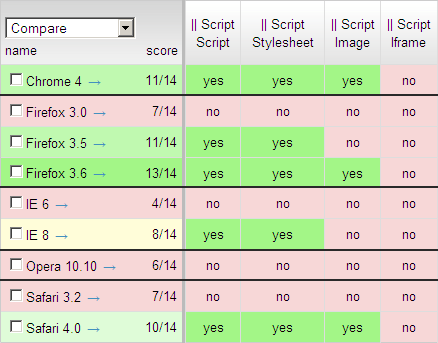
While downloading scripts, IE8 still blocks on images and iframes. Chrome 4, Firefox 3.6, and Safari 4 block on iframes. Opera 10.10 blocks on all resource types. I’m confident parallel script loading will continue to improve based on the great progress made in the last batch of browsers. Let’s keep our eyes on the next browsers to see if things improve even more.
Page Speed 1.6 Beta – new rules, native library
Page Speed 1.6 Beta was released today. There are a few big changes, but the most important fix is compatibility with Firefox 3.6. If you’re running the latest version of Firefox visit the download page to get Page Speed 1.6. Phew!
I wanted to highlight some of the new features mentioned in the 1.6 release notes: new rules and native library.
Three new rules were added as part of Page Speed 1.6:
- Specify a character set early – If you don’t specify a character set for your web pages or specify it too low in the page, the browser could parse it incorrectly. You can specify a character set using the META tag or in the Content-Type response header. Returning charset in the Content-Type header will ensure the browser sees it early. (See this Zoompf post for more information.)
- Minify HTML – Top performing web sites are already on top of this, right? Analyzing the Alexa U.S. top 10 shows an average savings of 8% if they minified their HTML. You can easily check your site with this new rule, and even save the optimized version.
- Minimize Request Size – Okay, this is cool and shows how Google tries to squeeze out every last drop of performance. This rule sees if the total size of the request headers exceed one packet (~1500 bytes). Requiring a roundtrip just to submit the request hurts performance, especially for users with high latency.
The other big feature I wanted to highlight first came out in Page Speed 1.5 but didn’t get much attention – the Page Speed C++ Native Library. It probably didn’t get much attention because it’s one of those changes that, if done correctly, no one notices. The work behind the native library involves porting the rules from JavaScript to C++. Why bother? Here’s what the release notes say:
Making Page Speed run faster is great, but the idea of implementing the performance logic in a C++ library so the rules can be run in other programs is very cool. And where have we seen this recently? In the Site Performance section recently added to Webmaster Tools. Now we have a server-side tool that produces the same recommendations found from running the Page Speed add-on. Here are the rules that have been ported to the native library:
added in 1.5:
|
added in 1.6:
|
Webmaster Tools Site Performance today shows recommendations based on the rules in native library 1.5. Now that more rules have been added to native library 1.6, webmasters can expect to see those recommendations in the near future. But this integration shouldn’t stop with Webmaster Tools. I’d love to see other tools and services integrate native library. If you’re interested in using native library, check out the page-speed project on Google Code and contact the page-speed-discuss Google Group.