
Firefox 3.5 at the top
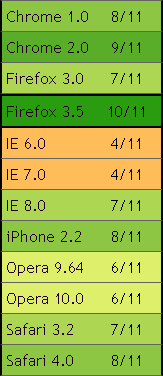
The web world is abuzz today with the release of Firefox 3.5. On the launch page, Mozilla touts the results of running SunSpider. Over on UA Profiler, I’ve developed a different set of tests that count the number of critical performance features browsers do, or don’t, have. Currently, there are 11 traits that are measured. Firefox 3.5 scores higher than any other browser with 10 out of 11 of the performance features browsers need to create a fast user experience.
Firefox 3.5 is a significant improvement over Firefox 3.0, climbing from 7/11 to 10/11 of these performance traits. Among the major browsers, Firefox 3.5 is followed by Chrome 2 (9/11), Safari 4 (8/11), IE 8 (7/11), and Opera 10 (6/11). Unfortunately, IE 6 and 7 have only 4 out of these 11 performance features, a sad state of affairs for today’s web developers and users.
The performance traits measured by UA Profiler include number of connections per hostname, maximum number of connections, parallel loading of scripts and stylesheets, proper caching of resources including redirects, the LINK PREFETCH attribute, and support for data: URLs. When I started UA Profiler, none of the browsers were scoring very high. But there’s great progress in the last year. It’s time to raise the bar! I plan on adding more tests to UA Profiler this summer, and hope the browser development teams will continue to rise to the challenge in an effort to make the Web a faster place for all of us.
Velocity: Tim O’Reilly and 20% discount
It was great to read Tim O’Reilly’s blog post about Velocity. He tells the story about the first meeting where we talked about starting a conference for the web performance and operations community. It almost didn’t happen! The first meeting got postponed. This was at OSCON, and Tim got tied up preparing his keynote. Luckily, we were able to get together the next day.
Looking back, that seems so long ago. The excitement about web performance has skyrocketed since then, in part because of Velocity. There’s also been a lot of tool development in that space, including Firebug, YSlow, Page Speed, HttpWatch, PageTest, VRTA, and neXpert. All of these tools, and more, will be showcased at Velocity, happening this week in San Jose. The sessions take place on Tuesday, June 23 and Wednesday, June 24.
As a final nod, Tim provides a 20% discount code: VEL09BLOG. I hope to see you here!
Simplifying CSS Selectors
This post is based on a chapter from Even Faster Web Sites, the follow-up to High Performance Web Sites. Posts in this series include: chapters and contributing authors, Splitting the Initial Payload, Loading Scripts Without Blocking, Coupling Asynchronous Scripts, Positioning Inline Scripts, Sharding Dominant Domains, Flushing the Document Early, Using Iframes Sparingly, and Simplifying CSS Selectors.
“Simplifying CSS Selectors” is the last chapter in my next book. My investigation into CSS selector performance is therefore fairly recent. A few months ago, I wrote a blog post about the Performance Impact of CSS Selectors. It talks about the different types of CSS selectors, which ones are hypothesized to be the most painful, and how the impact of selector matching might be overestimated. It concludes with this hypothesis:
For most web sites, the possible performance gains from optimizing CSS selectors will be small, and are not worth the costs. There are some types of CSS rules and interactions with JavaScript that can make a page noticeably slower. This is where the focus should be.
I received a lot of feedback about situations where CSS selectors do make web pages noticeably slower. Looking for a common theme across these slow CSS test cases led me to this revelation from David Hyatt’s article on Writing Efficient CSS for use in the Mozilla UI:
The style system matches a rule by starting with the rightmost selector and moving to the left through the rule’s selectors. As long as your little subtree continues to check out, the style system will continue moving to the left until it either matches the rule or bails out because of a mismatch.
This illuminates where our optimization efforts should be focused: on CSS selectors that have a rightmost selector that matches a large number of elements in the page. The experiments from my previous blog post contain some CSS selectors that look expensive, but when examined in this new light we realize really aren’t worth worrying about, for example, DIV DIV DIV P A.class0007 {}. This selector has five levels of descendent matching that must be performed. This sounds complex. But when we look at the rightmost selector, A.class0007, we realize that there’s only one element in the entire page that the browser has to match against.
The key to optimizing CSS selectors is to focus on the rightmost selector, also called the key selector (coincidence?). Here’s a much more expensive selector: A.class0007 * {}. Although this selector might look simpler, it’s more expensive for the browser to match. Because the browser moves right to left, it starts by checking all the elements that match the key selector, “*“. This means the browser must try to match this selector against all elements in the page. This chart shows the difference in load times for the test page using this universal selector compared with the previous descendant selector test page.

It’s clear that CSS selectors with a key selector that matches many elements can noticeably slow down web pages. Other examples of CSS selectors where the key selector might create a lot of work for the browser include:
A.class0007 DIV {}
#id0007 > A {}
.class0007 [href] {}
DIV:first-child {}
Not all CSS selectors hurt performance, even those that might look expensive. The key is focusing on CSS selectors with a wide-matching key selector. This becomes even more important for Web 2.0 applications where the number of DOM elements, CSS rules, and page reflows are even higher.
Velocity – fully programmed
With my book and Velocity hitting in the same month, I’ve been slammed. Even though we started the Velocity planning process eleven months ago, we’ve been tweaking the program schedule up to the last minute, making room for new products and technology breakthroughs. I’m happy to say that the slate of speakers is nailed down, and it looks awesome. Here’s a rundown of the what’s happening in the Performance track, including the most recent additions.
Workshops (Mon, June 22)
At this year’s conference, we added a day of workshops. I kick things off talking about Website Performance Analysis, where I’ll take a popular, but slow, web site and show the tools used to make it faster. Nicholas Zakas is getting into deep performance optimizations with Writing Efficient JavaScript, relevant to any web site that uses JavaScript (which is every one). I’m psyched to sit in on Nicole Sullivan’s workshop, The Fast and the Fabulous: 9 ways engineering and design come together to make your site slow. We worked together at Yahoo!, so I can vouch for her guru-ness when it comes to CSS and web design. The workshops end with Metrics that Matter by Ben Rushlo from Keynote Systems. This was a topic that was brainstormed at the Velocity Summit held earlier this year – the importance of identifying the metrics that you just have to be watching to track and improve your site’s performance.
Sessions Day 1 (Tues, June 23)
We had so many good speaker proposals, we decided to kick things off a bit earlier, starting at 8:30am. We’ll cover the exciting stuff right out of the gate – new product announcements! (My lips are sealed.) One of the most important talks of the conference is The User and Business Impact of Server Delays, Additional Bytes, and HTTP Chunking in Web Search – where Eric Schurman from Live Search (‘scuse me, Bing) and Jake Brutlag from Google Search co-present the results of experiments they ran measuring the impact of latency on users. Are you kidding me?! Microsoft and Google, presenting together, with hard numbers about the impact of latency, talking about experiments run on live traffic! This is unprecedented and can’t be missed. Eric and Jake are two of the smartest and nicest guys around, so grab them afterwards and ask questions.
There’s a reprise of last year’s popular browser matchup, What Makes Browsers Performant, with representatives from Internet Explorer, Firefox, and Chrome. Doug Crockford is talking about Ajax Performance, painting the landscape of how developers should view and optimize their Web 2.0 applications. Michael Carter’s presentation on Light Speed Comet will present this newer technique for high volume, low latency Ajax communication. Other performance-related presentations include a demo of Google’s new Page Speed performance tool, A Preview of MySpace’s Open-sourced Performance Tracker, The Secret Weapons of the AOL Optimization Team, Go with the Reflow by my good buddy Lindsey Simon, and Performance-Based Design – Linking Performance to Business Metrics by Aladdin Nassar.
Sessions Day 2 (Wed, June 24)
We start early again, and jump right into the good stuff. Marissa Mayer starts with a keynote talking about Google’s commitment to fast web sites, followed by lightning demos of Firebug, HttpWatch, AOL PageTest, YSlow 2.0, and Visual Round Trip Analyzer. In Shopzilla’s Site Redo, Phil Dixon delivers more killer stats about the business impact of performance, such as a “5% – 12% lift in top-line revenue”. These are the numbers developers need to be armed with when debating the priority of performance improvements within their company. The morning closes with Ben Galbraith and Dion Almaer talking about the Responsiveness of web applications.
Several afternoon sessions come from Google. Kyle Scholz and Yaron Friedman present High Performance Search at Google. These guys have to build advanced DHTML that works across a huge audience; it’ll be important to find out what worked for them. Tony Gentilcore, creator of Fasterfox, gets the conference’s Sherlock Holmes award for his discoveries about why compression doesn’t happen as often as we think, in Beyond Gzipping. Brad Chen talks about a new tact on high performance applications in the browser using Google Native Client.
Matt Mullenweg is presenting some of the recent performance enhancements baked into WordPress. It’s a real treat to have Matt on the program. Developers that have to monitor performance will want to hear MySpace.com’s talk Fistful of Sand. In addition to hearing from Google Search, we’ll also get a glimpse of Frontend Performance Engineering in Facebook. Eric Mattingly is demoing a new tool called neXpert. And the day closes with me talking about the State of Performance, and a favorite from last year, High Performance Ads – Is It Possible?.
One of the most rewarding things about Velocity 2008 was the amount of sharing that took place. Everyone was talking about the pitfalls to avoid and the successes that can be had. I see that happening again this year. All of these speakers are extremely approachable. They have great experience and are smart, too, but the key for Velocity is that you can walk up to any one of them afterward and ask for more details or share what you’ve discovered. The Web is out there. Velocity is where we work together to make it faster.
See you at Velocity!
[If you haven’t registered yet, make sure to use my "vel09cmb" 15% discount code.]
Using Iframes Sparingly
This post is based on a chapter from Even Faster Web Sites, the follow-up to High Performance Web Sites. Posts in this series include: chapters and contributing authors, Splitting the Initial Payload, Loading Scripts Without Blocking, Coupling Asynchronous Scripts, Positioning Inline Scripts, Sharding Dominant Domains, Flushing the Document Early, Using Iframes Sparingly, and Simplifying CSS Selectors.

Time to create 100 elements
Iframes provide an easy way to embed content from one web site into another. But they should be used cautiously. They are 1-2 orders of magnitude more expensive to create than any other type of DOM element, including scripts and styles. The time to create 100 elements of various types shows how expensive iframes are.
Pages that use iframes typically don’t have that many of them, so the DOM creation time isn’t a big concern. The bigger issues involve the onload event and the connection pool.
Iframes Block Onload
It’s important that the window’s onload event fire as soon as possible. This causes the browser’s busy indicators to stop, letting the user know that the page is done loading. When the onload event is delayed, it gives the user the perception that the page is slower.
The window’s onload event doesn’t fire until all its iframes, and all the resources in these iframes, have fully loaded. In Safari and Chrome, setting the iframe’s SRC dynamically via JavaScript avoids this blocking behavior.
One Connection Pool
Browsers open a small number of connections to any given web server. Older browsers, including Internet Explorer 6 & 7 and Firefox 2, only open two connections per hostname. This number has increased in newer browsers. Safari 3+ and Opera 9+ open four connections per hostname, while Chrome 1+, IE 8, and Firefox 3 open six connections per hostname. You can see the complete table in my Roundup on Parallel Connections.
One might hope that an iframe would have its own connection pool, but that’s not the case. In all major browsers, the connections are shared between the main page and its iframes. This means it’s possible for the resources in an iframe to use up the available connections and block resources in the main page from loading. If the contents of the iframe are as important, or more important, than the main page, this is fine. However, if the iframe’s contents are less critical to the page, as is often the case, it’s undesirable for the iframe to commandeer the open connections. One workaround is to set the iframe’s SRC dynamically after the higher priority resources are done downloading.
5 of the 10 top U.S. web sites use iframes. In most cases, they’re used for ads. This is unfortunate, but understandable given the simplicity of using iframes for inserting content from an ad service. In many situations, iframes are the logical solution. But keep in mind the performance impact they can have on your page. When possible, avoid iframes. When necessary, use them sparingly.